SUNLU FilaDryer S4 vs Creality SpacePi X4
SUNLU FilaDryer S4 vs Creality SpacePi X4 on maker data: heat, chambers, spool fit. Pick the S4 for PLA, PETG, TPU; the X4 for 85 °C engineering filaments.
On this page (15 sections)
Pick the SUNLU FilaDryer S4 if you mainly dry PLA, PETG, and TPU and want one big box that feeds up to four printers. Pick the Creality SpacePi X4 if you need to dry ABS, ASA, PC, or nylon at the 75–85 °C their makers give, or dry two materials at different temperatures at once. Both are four-spool dryers that can feed a printer while the spools sit inside. The S4 is one large chamber that SUNLU says holds four 1 kg spools and heats to 70 °C, with fans it says keep the chamber within ±3 °C. The X4 has two separately controlled chambers, each with its own heater, and Creality publishes a maximum spool size, which SUNLU doesn't do for the S4.
Who this comparison is for
This page is for anyone choosing between these two specific products: the SUNLU FilaDryer S4 in Black, and the Creality SpacePi X4. Both are built for people who keep several spools on the go, whether that's a multi-color setup or more than one printer. If you only dry one spool at a time, a single-spool dryer such as the ones in our SUNLU FilaDryer S2 vs Polymaker PolyDryer comparison may suit you better. If you're still deciding whether you need an active dryer at all, start with our filament dryer vs dry box guide. For the S4 against another multi-spool dryer, see our EIBOS Cyclopes vs SUNLU FilaDryer S4 comparison. For more dryers, see the filament dryer shortlist.
| Product | Best for | Skip if | Link |
|---|---|---|---|
| SUNLU FilaDryer S4 (Black, 4-spool dryer) | Multi-printer or multi-material setups that need four 1 kg spools dried and fed at once. | You only dry one spool at a time or have limited bench space. | View on Amazon (opens Amazon in a new tab) |
| Creality SpacePi X4 Filament Dryer (4-spool, dual-chamber) | Drying up to four spools, including engineering filaments that need 80 °C or more, with two separate temperature zones. | You only need to dry one spool, or your spools exceed 200 mm in diameter. | View on Amazon (opens Amazon in a new tab) |


How we compared them
This is a research-based comparison. Every figure below comes from the makers' own product pages, store pages, wiki, blog, and user manual, listed in the sources, plus Bambu Lab's and Prusa's published drying tables for the materials. We haven't tested either dryer, so nothing here is a measured result of ours. Where a maker describes its own product, such as "the world's first large-capacity filament dryer," we label it as the maker's claim.
Both makers give a maximum temperature and a rated power in watts, so those sit side by side below. SUNLU's own pages disagree on the S4's heater and rated power, so we list every figure it gives. Creality publishes energy-use figures from its own tests, and SUNLU doesn't, so that isn't a head-to-head.
Side-by-side specs
| SUNLU FilaDryer S4 | Creality SpacePi X4 | |
|---|---|---|
| Variant | Black, four-spool dryer | Four-spool, dual-chamber dryer |
| Chambers | One chamber, 450 × 210 × 211 mm inside (product page and wiki) | Two independent chambers, each with its own heater (product page) |
| Spool capacity | Up to four 1 kg spools (product page) | Four spools, 1 kg or 2 kg (product page) |
| Maximum spool size | Not stated on SUNLU's pages or user guide | Diameter up to 200 mm, width up to 150 mm (product page) |
| Temperature range | Up to 70 °C; lowest setting not stated on SUNLU's pages or user guide | 45–85 °C (product page) |
| Heater | PTC heater: 350 W (product page and wiki), 300 W (store page bullet), 330 W (store page description), 320–350 W (blog) | Two 200 W PTC heaters (product page) |
| Rated power | 300 W (product page and wiki); 320 W (store page) | 360 W (product page) |
| Timer | Up to 99 h (user guide) | 1–48 h (product page) |
| Air circulation | Two side circulation fans plus a bottom heating fan; chamber "within ±3°C" (product page) | 360° hot-air circulation; dual dehumidifying fans (product page) |
| Humidity handling | Humidity mode starts drying when humidity reaches a set 30–50% and stops at 25% (product page); the user guide calls it MO 2 and runs it after the countdown ends | Desiccant chamber regenerated by the heating airflow; one-way valve (product page) |
| Filament outlets | Eight filament holes; feeds up to four printers (store page) | Top and rear outlets with PTFE tube connectors (product page) |
| PTFE tubes included | Two 100 cm and four 8 cm (store page); two 100 cm (user guide packing list) | None; "The product does not contain PTFE tube" (product page) |
| Filament diameters | 1.75, 2.85, 3.0 mm (product page) | 1.75, 2.85 mm (product page) |
| Screen | Touch screen (user guide and SUNLU blog); size not stated | 3.2-inch touch screen (product page) |
| Product size | 458 × 218 × 312 mm, L × W × H (product page); the store page says this includes the tripod height | 382 × 290 × 270 mm, axes not labelled (product page) |
| Net weight | 4.8 kg (product page) | 5 kg (product page) |
| Power input | AC 110–240 V, 50/60 Hz (store page) | 100–120 V (US/JPN) or 220–240 V, 50/60 Hz (product page) |
| Safety features the maker lists | PTC thermistor, mechanical temperature switch, software monitoring (product page) | Fan-fault pause, self-resetting PTC fuse, NTC sensor at the air outlet (product page) |
Temperature: 70 °C vs 85 °C
This is the clearest difference. SUNLU says the S4 "heats up to 70°C," and its store page says it reaches 50 °C in 30 minutes. SUNLU's product page and wiki say that's enough "for fast drying of specialty filaments such as PA and PC." SUNLU's own comparison blog is more cautious. It lists "Max temp still limited to 70°C" as a con of the S4, and its advice is to choose the S4 if "You don't need temperatures above 70°C," pointing nylon and PC users to its 110 °C E2 instead.
Creality gives the SpacePi X4 a 45–85 °C range and says the higher top end "can save you nearly 50% of the time when drying engineering filaments such as PA-CF, PAHT, PPA." That figure is from Creality's own comparison of PA-CF dried at 70 °C for 8 h and 85 °C for 4 h, not a test we can check. Creality also notes that "at the same target temperature, the two chambers may have a real-time temperature difference of 1~5℃ during the heating process, which is normal."
SUNLU doesn't publish the S4's lowest temperature on the pages and user guide we checked, so we can't say how low it runs. Its user guide gives a drying timer of up to 99 hours.
One big chamber vs two separate ones
The S4 is a single 450 × 210 × 211 mm chamber. Everything inside dries at the same set temperature, and SUNLU says its three fans keep that chamber within ±3 °C. SUNLU's store page says it has preset temperatures for PLA, ABS, PETG, TPU, PA, and PC.
The X4 splits its four spools across two chambers, each with its own 200 W heater. Creality's example is PLA at 50 °C in one chamber and PA-CF at 85 °C in the other at the same time. You can also run one chamber alone. Creality says single-chamber mode "saves up to 40% energy," and gives 0.124 kWh for one chamber and 0.208 kWh for both, at 85 °C for one hour. SUNLU publishes no energy figure for the S4, so there's nothing to set beside those numbers.
So if you dry a mix of low- and high-temperature filaments, the X4 is built to do both at once. With the S4, everything in the box shares one setting.
Spool fit and capacity
- SUNLU FilaDryer S4. SUNLU says it holds four 1 kg spools and gives the 450 × 210 × 211 mm internal size, but doesn't publish a maximum spool diameter or width on the pages we checked.
- Creality SpacePi X4. Creality gives a maximum spool diameter of 200 mm and width of 150 mm, and says 3 kg or 5 kg spools work "as long as the spool diameter is ≤200mm, width ≤150mm."
The X4's 200 mm limit matters. A spool even a few millimetres larger than 200 mm across won't fit, so measure yours. For the S4, you can only check your spools against the chamber's inside size. "Holds four 1 kg spools" doesn't mean it holds every brand's 1 kg spool.
Feeding the printer
SUNLU says the S4 has eight filament holes and "support[s] 4 printers at the same time," and it ships with two 100 cm and four 8 cm PTFE tubes. Its blog adds that the outlets are on the top and side.
Creality's headline for the X4 is "Dry and print at once," with top and rear outlets. Its FAQ is more measured: "We recommend drying the filament thoroughly before printing," after which "you can feed the filament to your printer using a 4mm PTFE tube." The X4 doesn't come with PTFE tube, so plan to buy it. For Creality's own CFS multi-material system, Creality suggests drying fully in the X4 first and then moving the spool to the CFS, rather than feeding the CFS from the dryer.
Neither maker documents a tested fit with a specific printer's multi-material system on the pages we checked, so we don't claim one. SUNLU's AMS mention is user experience (see how this page was checked).
Keeping filament dry afterwards
Creality describes the X4 as a sealed store as well as a dryer. Its FAQ says it "functions as a sealed storage unit, keeping filaments dry even when not actively heating," using its "airtight design and built-in desiccant," and its desiccant is dried by the heating airflow so it doesn't need replacing. That's Creality's claim, with no humidity figures for storage.
SUNLU's humidity mode works differently. You set a humidity level between 30% and 50%, and the S4 starts drying when the box reaches it and stops when it drops to 25%. Its user guide calls this "MO 2," a humidity control mode that takes over "after the countdown ends"; the other mode, "MO 1," simply shuts down after the countdown. SUNLU's blog calls the S4 "Great as both dryer and long-term storage solution." SUNLU doesn't mention a desiccant for the S4.
Which materials each maker says it can dry
- SUNLU FilaDryer S4. SUNLU's store page lists presets for PLA, ABS, PETG, TPU, PA, and PC, and its product page says it suits "specialty filaments such as PA and PC." Its blog aims the S4 at workshops that need "several filaments (PLA, PETG, ABS, TPU) ready to go."
- Creality SpacePi X4. Creality lists PLA, PETG, ABS, ASA, PET, PA, PAHT, PC, PVA, PP, and TPU. Its product page suggests 50 °C for PLA, 60 °C for PETG and TPU, and 80–85 °C for ABS, PET, PC, ASA, PA, and PAHT, with a note to follow the filament maker's drying temperature first. Its user manual (V1.2) gives the same figures except 65 °C for PETG, and lists a drying time of 4–8 h.
Here is how the filament makers' own drying temperatures compare with each dryer's maximum.
| Material | Bambu Lab, forced-air oven | Prusa, Prusament | Within the S4's 70 °C? | Within the X4's 85 °C? |
|---|---|---|---|---|
| PLA | 50 °C for 8 h (PLA Basic / Matte) | 45 °C for 6 h | Yes | Yes |
| PETG | 60–65 °C for 8 h | 55 °C for 6 h | Yes | Yes |
| TPU | 70 °C for 8 h | 60 °C for 4–6 h | At the limit for Bambu's figure | Yes |
| ABS / ASA | 75–85 °C for 8 h | ASA 80 °C for 4 h | No | Yes |
| PC | 75–85 °C for 8 h | PC Blend 85 °C for 5 h | No | Yes, at the limit for Prusa's figure |
| PA (nylon) | PA6-CF/GF, PAHT-CF/GF: 75–85 °C for 8–12 h | PA11 Carbon Fiber 90 °C for 6 h | No | Bambu's range yes; Prusa's 90 °C no |
Bambu also warns that PA-based filaments left in open air for about three months become "very difficult to dry" even in a convection oven at 80–90 °C. Creality says filaments needing more than 85 °C "can still be dried, but with longer drying times." That's its claim, with no figures. Follow the drying guidance for your exact spool. If it calls for more than 70 °C, the S4 doesn't reach it, and above 85 °C neither does the X4.
Spool temperature limits
A dryer's top heat is only useful if the spool can take it.
- Creality warns on the X4's page, "High-temperature drying should consider the heat resistance of the spools," and its user manual says the spool's heat resistance "must exceed the set drying temperature; otherwise, there is a risk of heat deformation."
- Bambu Lab rates its low-temperature reusable spool, used for PLA and PETG, at 70 °C or below, and its high-temperature spool at 90 °C or below, and warns that "Some third-party spools may not be heat-resistant enough and could deform during drying."
- Prusa says the black Prusament spool it introduced from October 2025 resists drying temperatures as high as 90 °C, but older black Prusament spools are only safe to about 45 °C unless you add a screw to hold them together.
Neither dryer maker publishes a spool temperature rating, so check your spool before running either one at full heat, especially the X4 at 85 °C.
Power and footprint
Creality rates the X4 at 360 W. SUNLU's S4 figures vary by page: rated power is 300 W or 320 W, and the heater is anywhere from 300 to 350 W (the spec table above lists each source), so we can't give one number. SUNLU's blog lists the S4's power as "320–350 W."
The two are similar in weight, 4.8 kg for the S4 and 5 kg for the X4. Their shapes differ. The S4 is long and narrow, 458 × 218 × 312 mm, which SUNLU says includes "the height of the tripod." Creality lists the X4 as 382 × 290 × 270 mm without labelling the axes, so check the product photos before planning shelf space. Neither maker gives an outer-surface temperature on the pages and manual we checked.
What each maker says it's for
- SUNLU FilaDryer S4. SUNLU calls it "the world's first large-capacity filament dryer," built "for makers who need a serious filament dryer for 3D printing across multiple colors, materials, or machines." Its blog positions it for "Makers running multiple printers, multi-color projects, or workshops."
- Creality SpacePi X4. Creality pitches it as "Dry More, Create More," with its 85 °C top end "Ideal for Engineering Filaments" and two chambers for "simultaneous drying of two filament types at different temperatures in one machine."

SUNLU FilaDryer S4 (Black, 4-spool dryer)
- Best for
- Multi-printer or multi-material setups that need four 1 kg spools dried and fed at once.
- Skip this if
- You only dry one spool at a time or have limited bench space.
Specs, strengths, and limitations
- Capacity
- Four 1 kg spools; internal size 450 × 210 × 211 mm (SUNLU). Maximum spool diameter and width are not stated.
- Outer size
- 458 × 218 × 312 mm
- Part rated to
- 70 °C (your printer's own hotend limit may be lower)
- Maker notes
- SUNLU lists product size 458 × 218 × 312 mm (L×W×H); the store page says this includes the height of the tripod. SUNLU states heater power inconsistently: '350W PTC heater' with rated power 300 W (sunlu.com product page and wiki); 'Built-in 300W PTC heater' in the store bullets but 'a heating power of 330W' in the store description, with rated power 320 W (store page); its blog gives '320–350 W'. Dual side circulation fans plus a bottom heating fan; SUNLU states chamber temperature is balanced within ±3 °C. Humidity mode: drying starts when humidity reaches the set value (30–50%) and stops at 25% (SUNLU). Triple protection: PTC thermistor, temperature switch and software monitoring (SUNLU). Filament diameters 1.75 / 2.85 / 3.0 mm; SUNLU states it can feed up to 4 printers; the store page lists 2 × 100 cm and 4 × 8 cm PTFE tubes; the user guide packing list shows 2 × 100 cm Teflon tubes, a power cord and 8 rollers. The Amazon listing gives 460 × 220 × 310 mm, a 350 W heater and a 35–70 °C range; SUNLU's own figures are used here. SUNLU's user guide gives a drying timer of up to 99 h, a touch screen with filament-type presets, and two modes: MO1 time control (shuts down after countdown) and MO2 humidity control (after the countdown, reheats when humidity rises to 50% or a user-set 30–50% and stops at 25%).
- Manufacturer states it can dry four 1 kg spools at once in a 450 × 210 × 211 mm chamber.
- Manufacturer states side and bottom fans keep chamber temperature within ±3 °C.
- Manufacturer lists triple safety protection (PTC thermistor, temperature switch, software monitoring with alerts).
- Large footprint: SUNLU lists 458 × 218 × 312 mm.
- 70 °C maximum, and SUNLU does not state a maximum spool diameter or width, so check large spools before buying.
- SUNLU's own pages disagree on heater power (300, 330 or 350 W) and rated power (300 or 320 W).
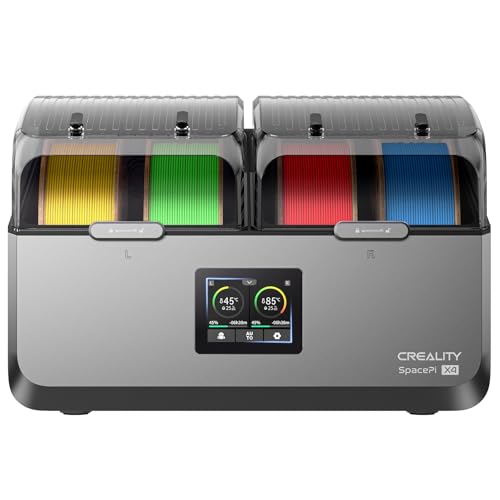
Creality SpacePi X4 Filament Dryer (4-spool, dual-chamber)
- Best for
- Drying up to four spools, including engineering filaments that need 80 °C or more, with two separate temperature zones.
- Skip this if
- You only need to dry one spool, or your spools exceed 200 mm in diameter.
Specs, strengths, and limitations
- Capacity
- Four spools (1 kg/2 kg spools); spool diameter ≤ 200 mm, width ≤ 150 mm (Creality)
- Part rated to
- 85 °C (your printer's own hotend limit may be lower)
- Maker notes
- Creality product parameters: temperature range 45–85 ℃, drying time 1–48 h, rated power 360 W, product size 382*290*270 mm (axes not labelled), net weight 5 kg. Two independent chambers, each with a 200 W PTC heater (Creality). Housing material ABS/PA/PC, flame retardant grade UL 94 V-0 (Creality). Creality lists energy use of 0.124 kWh (single-chamber mode) and 0.208 kWh (dual-chamber mode) for 1 h at a target of 85 °C. Filament diameters 1.75 / 2.85 mm. Creality: '*The product does not contain PTFE tube.' Creality: '*High-temperature drying should consider the heat resistance of the spools.' The Amazon listing adds that other brands' plastic spools should be heat resistant. Creality's user manual V1.2 recommends 65 °C for PETG (the product page says 60 °C) and a 4–8 h drying time, and says spool heat resistance 'must exceed the set drying temperature'.
- Manufacturer states two independently controlled chambers that can dry different filaments at different temperatures.
- Manufacturer lists a 45–85 °C range and a 1–48 h drying time.
- Manufacturer states spools up to 200 mm diameter and 150 mm width fit.
- Creality warns that high-temperature drying must consider spool heat resistance, so third-party plastic spools may not tolerate 85 °C.
- Spools wider than 150 mm or larger than 200 mm in diameter will not fit (Creality limit).
Verdict: which should you buy?
Choose the SUNLU FilaDryer S4 if…
- You mostly dry PLA, PETG, and TPU, whose makers' drying temperatures sit at or below 70 °C.
- You want to feed up to four printers straight from the dryer, with PTFE tubes in the box.
- You use 3.0 mm filament, which SUNLU lists and Creality doesn't.
Choose the Creality SpacePi X4 if…
- You dry ABS, ASA, PC, or nylon and want a dryer documented to reach the 75–85 °C their makers give.
- You want to dry two materials at different temperatures at the same time.
- You want a published maximum spool size to plan around, and your spools are no more than 200 mm across.
Safety and limits
How this page was checked
Every specification, temperature, and drying figure above comes from the manufacturer documents in the sources section, retrieved on 2026-10-09. We haven't used either dryer for this page, so nothing here is a measured result of ours. Where SUNLU's pages disagree with each other (the S4's heater and rated power, and whether 70 °C suits PA and PC), we've reported each figure or claim with where it appears. SUNLU's S4 user guide, linked from its product page, is a single image page with no text layer, so on 2026-10-14 we read it from the rendered page and used only its printed text. It gives the 99-hour timer and the MO 1 and MO 2 modes, but no lowest temperature, and its packing list shows two 100 cm PTFE tubes where the store page lists two 100 cm and four 8 cm. Creality's X4 user manual (V1.2) is readable, and its drying table differs from the product page on PETG (65 °C vs 60 °C), so we've reported both. SUNLU's blog says the S4 works with Bambu Lab's AMS because "many users" pair them; that's user experience rather than a documented fit, so we haven't used it. Read more in our editorial standards and affiliate disclosure.
Dryers & dry boxes: what to check before you buy ↗Sources
- FilaDryer S4 product page, SUNLU
- SUNLU FilaDryer S4 (SUNLU store), SUNLU
- Filament Dryer wiki, SUNLU
- FilaDryer S4 user guide, SUNLU
- SUNLU Filament Dryer Comparison: S2 vs S4 vs E2, SUNLU
- Creality SpacePi X4 product page, Creality
- Creality SpacePi X4 User Manual V1.2, Creality
- Filament drying recommendations, Bambu Lab
- Refill Filament with Bambu Reusable Spool, Bambu Lab
- Drying filament, Prusa Research
This page is research-based: we have not tested the products or methods ourselves. It draws on the manufacturer documentation and sources listed. Exact settings and fit always defer to your printer and filament makers.
Keep reading

Best Filament Dryers (2026), by Spool Count and Max Temp
The best filament dryers by need: ten units with published maker specs for one spool, several spools, engineering materials, or drying plus sealed storage.
Filament dryer vs dry box: drying and storage explained
A dry box keeps dry filament dry; a dryer removes moisture that is already in it. How to tell which problem you have, and what to do safely.
SUNLU FilaDryer S2 vs Polymaker PolyDryer
SUNLU FilaDryer S2 vs Polymaker PolyDryer on maker data: heat, spool fit, power, feeding. Pick the S2 to set a temperature, the PolyDryer for sealed storage.