Best 3D Printing Tools (2026): Cutters, Calipers, Hex Keys, Glue
The best 3D printing tools by job: nine for cutting, deburring, measuring, maintenance and bed adhesion, each with the rating and limits its maker publishes.

On this page (16 sections)
For snipping strings, brims, and support nubs, start with Hakko's CHP-170 flush cutter, which has the higher stated capacity of the two cutters here (Hakko rates it for copper wire only). Xuron's 170-II is the finer trimmer for soft plastic up to 1 mm. For cleaning brim edges and holes, the Noga Burr 3 is a swivel deburring tool. For checking filament diameter and calibration prints, iGaging's OriginCal caliper states 0.02 mm accuracy. For printer maintenance, Bondhus and Wera both make nine-piece metric hex key sets, and Hakko's 7-SA tweezers reach tight spots once the hotend is cool. For bed adhesion, Magigoo Original is a liquid made with glass beds in mind, and Creality's glue stick is a simple solid stick. The fit rule: buy for the job, not a kit. Check your printer's manual for the hex sizes it calls for, and your build plate maker's guidance before putting either adhesive on PEI.
Quick picks
| Need | Pick | Why |
|---|---|---|
| Snipping filament ends and support nubs | Hakko CHP-170 | The higher stated capacity of the two cutters here (16 AWG copper wire; Hakko rates copper only) |
| Fine trimming of strings and thin supports | Xuron 170-II | The only cutter maker here that names plastic in its rating, up to 1 mm |
| Checking filament diameter and calibration prints | iGaging OriginCal caliper | iGaging states 0.02 mm accuracy and 0.01 mm resolution |
| Small screws that round off | Wera 950/9 Hex-Plus set | Wera says the Hex-Plus profile almost eliminates the risk of destroying the screw recess |
| Glass build plates | Magigoo Original | Magigoo says it was designed and extensively tested on glass build plates |
Picks are matched to documented needs, not scored.
Who this guide is for
This page is for anyone setting up a printing bench or replacing the basic tools that came in the printer box. Most printers ship with the hex keys needed for routine maintenance, so first check which tools and sizes your printer's manual actually calls for. Our tools hub has a short checklist. If prints won't stick, buy nothing yet: work through first-layer adhesion troubleshooting first.
| Product | Best for | Skip if | Link |
|---|---|---|---|
| Hakko CHP-170 Medium Cutter (Single cutter, red grips (part number CHP-170)) | Clipping strings, brims, and small support nubs at the part surface; Hakko rates it for copper wire up to 16 AWG only. | You need to cut steel wire, zip-tie heads in bulk, or thick parts. | View on Amazon (opens Amazon in a new tab) |
| Xuron Micro-Shear Flush Cutter 170-II (Model 170-II, standard (no lead retainer), single) | Fine trimming of soft plastic supports, stringing, and small sprues on PLA or PETG parts. | You need to cut hardened wire, or materials thicker than its 1 mm rating as part of regular work. | View on Amazon (opens Amazon in a new tab) |
| Noga Engineering Noga Burr 3 Deburring Tool (NG1003: NG-1 handle with S10, S20, and S35 blades) | Cleaning elephant's-foot flares, hole edges, and brim remnants on printed parts. | You only need to clip supports. A flush cutter does that faster. | View on Amazon (opens Amazon in a new tab) |
| iGaging IP54 OriginCal Absolute Digital Caliper (0–6 in / 150 mm, item 100-700-06) | Measuring filament diameter, calibration prints, and fit-critical parts. | You need calibrated, traceable lab measurements. | View on Amazon (opens Amazon in a new tab) |
| Bondhus Balldriver Ball End L-Wrench Set (10999 (BLX9M), 9 pieces, 1.5–10 mm, long arm, ProGuard finish) | General printer assembly and maintenance on metric hex-socket screws. | Your printer uses Torx screws, or you need inch sizes. | View on Amazon (opens Amazon in a new tab) |
| Wera 950/9 Hex-Plus Multicolour 2 L-key set, metric, BlackLaser (Article number 05133164001, 9 pieces, 1.5–10 mm) | Frequent printer maintenance where you want color-coded keys that resist rounding small screws. | You want the slimmest keys for cramped toolheads, or you need inch sizes. | View on Amazon (opens Amazon in a new tab) |
| Hakko CHP 7-SA Very Fine Point Tweezers (Part number 7-SA, curved/bent very fine tips) | Pulling ooze and strings from a cooled nozzle area, placing small inserts, and picking support bits. | You need tweezers for heavy prying or for handling a hot hotend. | View on Amazon (opens Amazon in a new tab) |
| Magigoo (Thought3D) Magigoo Original 3D Printing Adhesive (50 mL pen applicator (Amazon model MO2016)) | Glass or smooth beds where PETG sticks too hard or ABS warps at the corners. | Your plate maker advises against adhesives, or you print nylon, PC, or PP. | View on Amazon (opens Amazon in a new tab) |
| Creality Glue Stick for Build Plate (1 stick, 21 g) | A cheap release layer or adhesion aid on glass or smooth plates, or for PETG release on PEI where the plate maker allows it. | Your plate maker says not to use glue on it. | View on Amazon (opens Amazon in a new tab) |


How we chose
A product made the list only if it met these criteria:
- Manufacturer documentation for the exact item. Each record matches one Amazon listing to one maker part or article number, such as Hakko's CHP-170, Noga's NG1003, iGaging's 100-700-06, Bondhus's 10999, and Wera's 05133164001.
- A stated rating or capacity. Cutters have a maker-stated cutting capacity, the caliper a stated accuracy, and the adhesives a stated list of materials and surfaces. We report each figure with its basis, such as "copper wire" for a cutter rating.
- Honest limits. Where a maker doesn't rate a tool for a 3D printing job, such as cutting filament, we say so instead of filling the gap.
They do different jobs, so compare tools within each job.
Cutting filament and supports: Hakko CHP-170 Medium Cutter
Hakko describes the CHP-170 as a "tool for a flush cut with very sharp cutting edges". It lists a maximum cut of 16 AWG copper wire, a blade hardness of 56 HRC, and a cutting force of 5 kg. Hakko notes that "max cut is determined with copper wire." That's the key caveat: Hakko makes no claim about filament or support material. It has the higher stated capacity of the two cutters here, so it's the better fit for snipping filament ends and support nubs, but cutting 1.75 mm filament is outside anything Hakko states. Hakko also sells a version with a safety clip (CHP-170-A).

Hakko CHP-170 Medium Cutter (Single cutter, red grips (part number CHP-170))
- Best for
- Clipping strings, brims, and small support nubs at the part surface; Hakko rates it for copper wire up to 16 AWG only.
- Skip this if
- You need to cut steel wire, zip-tie heads in bulk, or thick parts.
Specs, strengths, and limitations
- Maker notes
- Hakko specs: Part Number CHP-170; Cutting Force 5 kg; Max Cut 16 AWG copper wire; Rockwell Hardness (RHC) 56. Hakko notes that 'Max cut is determined with copper wire.' Hakko describes it as a 'Tool for a flush cut with very sharp cutting edges'. Variants: CHP-170-A (with safety clip) and CHP-170-D (dissipative handles). Hakko does not rate it for any specific filament. Its rating is for copper wire. Hakko's CHP catalog lists the CHP-170 under Medium Cutters: 'Excellent general use tool. 16 AWG max cut.'
- Manufacturer states it is a flush-cut tool with very sharp cutting edges.
- Manufacturer lists a maximum cut of 16 AWG copper wire and blade hardness of 56 HRC.
- Manufacturer states a low cutting force of 5 kg.
- Hakko rates it for copper wire up to 16 AWG only and gives no rating for hard or steel wire.
- Hakko makes no claim about cutting filament or support material. Its rating is for copper wire only.
Skip it if you need to cut steel wire, zip-tie heads in bulk, or thick printed parts.
Fine trimming: Xuron 170-II Micro-Shear Flush Cutter
Xuron is the only cutter maker here that names plastic in its rating. It states a cutting capacity of "soft copper wire, component lead wire and soft plastic up to 18 AWG (1mm) diameter", and says its by-pass cutting edges slice "cleanly through the metal." That 1 mm limit is below the 1.75 mm diameter of common filament. Xuron's 3D printing blog posts still recommend the 170-II for trimming filament ends before loading, without naming a diameter, so treat it as a fine trimmer for strings, small sprues, and thin supports, and filament ends as Xuron's advice rather than its rating. This record is the standard 170-II. Xuron also makes versions with a lead retainer or ESD-safe grips.

Xuron Micro-Shear Flush Cutter 170-II (Model 170-II, standard (no lead retainer), single)
- Best for
- Fine trimming of soft plastic supports, stringing, and small sprues on PLA or PETG parts.
- Skip this if
- You need to cut hardened wire, or materials thicker than its 1 mm rating as part of regular work.
Specs, strengths, and limitations
- Maker notes
- Xuron specs: overall length 5 inches (127 mm); Rockwell hardness 54–56 Rc; cutting capacity 'soft copper wire, component lead wire and soft plastic up to 18 AWG (1mm) diameter'. Xuron makes the 170-II series in four configurations: 170-II, 170-IIF (lead retainer), 170-IIAS (ESD-safe grips), and 170-IIASF (both). This record is the standard 170-II. Xuron states the 170-II series is made at its factory in Saco, Maine, USA. Product page: '18 AWG (1 mm) soft wire'; 'Not for use on hardened wire'. Weight 1.9 oz (FAQ).
- Manufacturer states it cuts soft plastic as well as soft copper and component lead wire.
- Manufacturer states its by-pass cutting edges slice 'cleanly through the metal', with about half the effort of compression cutters.
- Manufacturer states it is made in Saco, Maine, USA, with blade hardness of 54–56 Rc.
- Rated up to 18 AWG (1 mm) soft wire and soft plastic, below 1.75 mm filament diameter. Xuron's 3D printing blog posts nonetheless recommend it for flush-cutting filament ends before loading.
- Light-duty tool: Xuron rates it for soft materials only.
Skip it if you mainly want to snip 1.75 mm filament ends or harder materials.
Deburring and finishing: Noga Burr 3 (NG1003)
Noga says the NG1003 "will do most of your deburring jobs". It comes with an NG-1 handle and three blades. In Noga's catalog, only the S10 blade is listed for plastic, alongside steel and aluminium. The S20 is for brass and cast iron, and the S35 for straight edges on most materials. On printed parts, that makes it a tool for cleaning flared first-layer edges, hole edges, and brim remnants. Noga's catalog is about deburring edges, not trimming thin walls. The blades are sharp and swivel, so always cut away from your hand.

Noga Engineering Noga Burr 3 Deburring Tool (NG1003: NG-1 handle with S10, S20, and S35 blades)
- Best for
- Cleaning elephant's-foot flares, hole edges, and brim remnants on printed parts.
- Skip this if
- You only need to clip supports. A flush cutter does that faster.
Specs, strengths, and limitations
- Maker notes
- Noga catalog: 'NOGA BURR 3 NG1003 — Will do most of your deburring jobs. INCLUDES: NG-1 handle, S10, S20 and S35 blades.' The NG-1 handle holds all 3.2 mm S blades, and spare blades can be stored inside the handle. Noga catalog blade uses: S10 (BS1010) 'steel, aluminium and plastic'; S20 (BS2010) 'brass and cast iron'; S35 (BS3510) 'straight edges on most materials'. The Amazon listing brand reads 'Noga DeBurrs' and the model is NG1003, which matches.
- Manufacturer states the NG1003 'will do most of your deburring jobs'.
- Manufacturer catalog lists the included S10 blade for steel, aluminium, and plastic.
- Manufacturer states the handle takes all 3.2 mm S blades and stores spares inside.
- Blades are sharp and swivel. Cut away from your hand. Noga's catalog is about deburring edges, not trimming thin printed walls.
- Only the S10 blade is listed for plastic. The S20 is listed for brass and cast iron.
Skip it if you only need to clip supports. A flush cutter does that faster.
Measuring: iGaging OriginCal Absolute Digital Caliper
A caliper is how you check filament diameter, calibration prints, and parts that have to fit. iGaging lists this 150 mm model (100-700-06) with an accuracy of 0.02 mm and a resolution of 0.01 mm. Don't read the last displayed digit as exact, because the stated accuracy is twice the resolution. iGaging also states an absolute encoder that remembers its zero at power-on, an IP54 rating, a stainless steel frame, and SPC/USB data output. It runs on a CR2032 coin cell, which iGaging says is included.

iGaging IP54 OriginCal Absolute Digital Caliper (0–6 in / 150 mm, item 100-700-06)
- Best for
- Measuring filament diameter, calibration prints, and fit-critical parts.
- Skip this if
- You need calibrated, traceable lab measurements.
Specs, strengths, and limitations
- Maker notes
- iGaging table: 100-700-06, range 0–6"/150 mm, accuracy 0.001"/0.02 mm. iGaging features: absolute encoder that 'memorize[s] absolute origin zero'; resolution 0.0005"/0.01 mm; inch/metric conversion; IP54; stainless steel frame; SPC/USB data output; 3V CR2032 battery included; protective case.
- Manufacturer states an accuracy of 0.02 mm over a 150 mm range, enough to check filament diameter and printed part dimensions.
- Manufacturer states the absolute encoder remembers its zero, so you don't need to re-zero at power-on.
- Manufacturer states an IP54 rating, a stainless steel frame, and SPC/USB data output.
- Resolution is 0.01 mm but iGaging's stated accuracy is 0.02 mm, so don't read the last digit as exact.
- Uses a CR2032 coin cell. iGaging states one is included.
Skip it if you need calibrated, traceable lab measurements.
Maintenance: Bondhus Balldriver L-Wrench Set (10999)
Bondhus lists nine long ball-end L-wrenches: 1.5, 2, 2.5, 3, 4, 5, 6, 8, and 10 mm. Bondhus makes no printer-specific claims, so match the sizes against your printer's manual. The ball end, Bondhus says, "inserts into screw at a 25° angle", which helps on screws you can't reach straight on.

Bondhus Balldriver Ball End L-Wrench Set (10999 (BLX9M), 9 pieces, 1.5–10 mm, long arm, ProGuard finish)
- Best for
- General printer assembly and maintenance on metric hex-socket screws.
- Skip this if
- Your printer uses Torx screws, or you need inch sizes.
Specs, strengths, and limitations
- Maker notes
- Bondhus table: part 10999, model BLX9M, 9 long ball-end L-wrenches in 1.5, 2, 2.5, 3, 4, 5, 6, 8, and 10 mm. Bondhus states the ball end 'inserts into screw at a 25° angle', the tips are chamfered, and the tools are made of heat-treated Protanium steel. The ball-end range is listed under the ProGuard finish. Bondhus makes no printer-specific claims; check your printer's manual for the hex sizes it calls for.
- Manufacturer lists nine metric sizes from 1.5 to 10 mm.
- Manufacturer states the ball end inserts into the screw at a 25° angle, for hard-to-reach places.
- Manufacturer states the keys are heat-treated Protanium steel with chamfered tips for full engagement.
- Metric only. Bondhus sells inch sets separately.
Skip it if your printer uses Torx screws, or you need inch sizes.
Maintenance: Wera 950/9 Hex-Plus Multicolour L-key set
Wera's set covers the same nine metric sizes as the Bondhus set, from 1.5 × 50 mm to 10 × 125 mm, with a ball end on the long arm. The difference is the profile. Wera says its Hex-Plus shape has a larger contact surface in the screw head and allows up to 20% more torque, and that it "almost completely eliminates the risk of destroying the screw recess". That suits small printer screws that round off easily. Color-coded sleeves make the right size quick to find, but Wera's sleeves also make the keys bulkier in tight spaces.

Wera 950/9 Hex-Plus Multicolour 2 L-key set, metric, BlackLaser (Article number 05133164001, 9 pieces, 1.5–10 mm)
- Best for
- Frequent printer maintenance where you want color-coded keys that resist rounding small screws.
- Skip this if
- You want the slimmest keys for cramped toolheads, or you need inch sizes.
Specs, strengths, and limitations
- Maker notes
- Wera datasheet: article 05133164001 (EAN 4013288207517). Set contents: 1.5 x 50, 2 x 56, 2.5 x 63, 3 x 71, 4 x 80, 5 x 90, 6 x 100, 8 x 112, and 10 x 125 mm. Set size 145 x 95 x 30 mm, weight 425 g. Wera states the Hex-Plus profile has a larger contact surface in the screw head and allows up to 20% more torque, with a ball end on the long arm, BlackLaser surface treatment, and color-coded thermoplastic sleeves. The Amazon listing's model reads '5133164001', the same article number without the leading zero.
- Manufacturer states the Hex-Plus profile 'almost completely eliminates the risk of destroying the screw recess'.
- Manufacturer lists nine metric sizes from 1.5 to 10 mm, with a ball end on the long arm.
- Manufacturer states the color coding and size markings make the right key quick to find.
- Plastic sleeves make the keys bulkier than plain L-keys in tight spaces.
- Metric only. Wera sells imperial versions separately.
Skip it if you want the slimmest keys for a cramped toolhead, or you need inch sizes.
Maintenance: Hakko CHP 7-SA Very Fine Point Tweezers
Hakko describes the 7-SA as "very fine point tweezers with bent tips for easier grip in high density areas", made from non-magnetic stainless steel. On a printer, that means pulling ooze and strings from around a cooled nozzle, placing small inserts, and picking support bits out of tight corners. Hakko doesn't heat-rate them for handling a hot nozzle, and its own page gives two different lengths (115 mm and 120 mm), noting that dimensions are for reference only. Very fine tips bend if you pry with them.

Hakko CHP 7-SA Very Fine Point Tweezers (Part number 7-SA, curved/bent very fine tips)
- Best for
- Pulling ooze and strings from a cooled nozzle area, placing small inserts, and picking support bits.
- Skip this if
- You need tweezers for heavy prying or for handling a hot hotend.
Specs, strengths, and limitations
- Maker notes
- Hakko: 'Very fine point tweezers with bent tips for easier grip in high density areas.' CHP tweezers are 'manufactured with high quality stainless, non-magnetic, antacid steels'. Hakko's page gives two lengths: 120 mm (4-3/4") in the description and 115 mm (4-1/2") under Specifications, and notes 'Dimensions are for reference only'. The Amazon title gives 4-1/2".
- Manufacturer states very fine bent tips for gripping in tight, high-density areas.
- Manufacturer states non-magnetic stainless steel construction.
- Very fine tips can bend if used to pry. Hakko markets them for delicate precision assembly.
- Not heat-rated by Hakko for handling a hot nozzle. Let the hotend cool, or follow your printer maker's maintenance steps.
Skip it if you need tweezers for prying, or for working on a hot hotend.
Bed adhesion: Magigoo Original
Magigoo's datasheet (v1.5) describes a water-based adhesive for heated beds on aluminium and glass, which "also works" on sheets such as PEI and Kapton, for PLA, ABS, HIPS, PETG, and TPU. Magigoo says parts hold while the bed is hot and release once it cools by about 30–40 °C, and that it cleans off with water. Its current product page says it was "designed and extensively tested on glass build plates", so glass is where it fits most naturally. The datasheet and product page list slightly different bed temperatures, so follow your filament maker's settings. Magigoo makes separate formulas for nylon, PC, and PP.

Magigoo (Thought3D) Magigoo Original 3D Printing Adhesive (50 mL pen applicator (Amazon model MO2016))
- Best for
- Glass or smooth beds where PETG sticks too hard or ABS warps at the corners.
- Skip this if
- Your plate maker advises against adhesives, or you print nylon, PC, or PP.
Specs, strengths, and limitations
- Maker notes
- Magigoo datasheet v1.5: water-based ('Solvent: water'); intended 'on FDM/FFF 3D printers with a heated bed on aluminium, glass surfaces. Also works when applied on sheets e.g. Kapton, PEI and similar', for PLA, ABS, HIPS, PETG, and TPU. Datasheet bed temperatures: ABS 90–110 °C, PLA 40–70 °C, PETG 80–100 °C, HIPS 90–115 °C, TPU 30–60 °C. The current product page lists slightly different 'optimised' ranges (for example PLA 50–70 °C, PETG 70–90 °C), so follow your filament maker's settings. The product page also lists ASA as 'Compatible' (90–110 °C): 'Works with some ASA filament brands. Better suited for glass build plates.' Magigoo's printed instructions give a third set of bed temperatures (PLA 40–60 °C, ABS 90–110 °C, PETG 60–85 °C, HIPS 90–110 °C). Magigoo states prints release once the bed cools by about 30–40 °C, and that it cleans with water. This is a liquid adhesive in a valved pen applicator, not a solid glue stick. The 50 mL volume comes from the Amazon title. The Magigoo page doesn't state a volume.
- Manufacturer states it holds parts while the bed is hot and releases them as it cools.
- Manufacturer datasheet lists PLA, ABS, PETG, HIPS, and TPU, on glass and aluminium beds and on PEI or Kapton sheets.
- Manufacturer states it is water-based and cleans off with water.
- Magigoo's current product page says it was 'designed and extensively tested on glass build plates'. The datasheet says it 'also works' on PEI. Check your build plate maker's guidance before using any adhesive on PEI.
- Not for nylon, PC, or PP. Magigoo makes separate formulas for those.
Skip it if your build plate maker advises against adhesives, or you print nylon, PC, or PP.
Bed adhesion: Creality Glue Stick for Build Plate
Creality's store lists this as a 21 g stick for PLA, ABS, PETG, PC, PA, and TPU, and says it keeps steady adhesion so models don't come loose or warp. That's all the guidance Creality gives. It says nothing about which build surfaces it suits, so check your plate maker's advice before using it on textured or smooth PEI. On some surfaces a glue layer is used as a release aid for PETG rather than for extra grip. The Amazon listing is for one stick. A 4-pack is a separate listing.
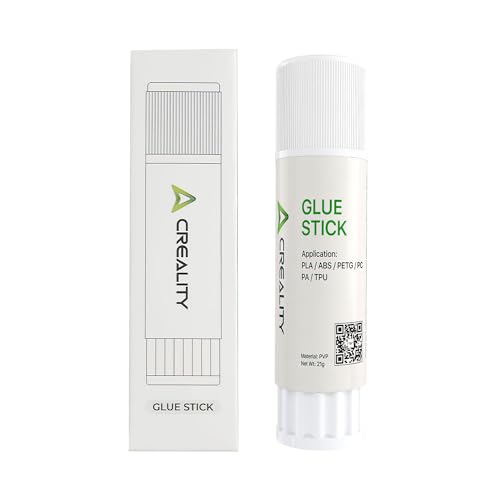
Creality Glue Stick for Build Plate (1 stick, 21 g)
- Best for
- A cheap release layer or adhesion aid on glass or smooth plates, or for PETG release on PEI where the plate maker allows it.
- Skip this if
- Your plate maker says not to use glue on it.
Specs, strengths, and limitations
- Maker notes
- Creality store: 'Capacity: 21g'; 'Application: PLA/ABS/PETG/PC/PA/TPU'. Creality's blog describes this glue stick as 'Made from high-quality PVP material.' The Amazon listing (1 Pack) adds that it cleans off with water once the plate cools. 21 g comes from Creality's store page. A 4-pack is a separate ASIN (B0D3XLHVLZ).
- Manufacturer states it keeps steady adhesion so models don't come loose or warp.
- Manufacturer lists PLA, ABS, PETG, PC, PA, and TPU as applications.
- Creality's page gives no build-surface guidance. Check your build plate maker's advice before using glue on textured or smooth PEI.
- Small 21 g stick, per Creality.
Skip it if your build plate maker says not to use glue on it.
What should you check before buying 3D printing tools?
- Hex sizes and screw type. Both key sets are metric. Check your printer's manual for the exact sizes, and whether any screws are Torx instead.
- Cutter ratings. Hakko rates by copper wire and Xuron by soft wire and soft plastic up to 1 mm. Neither maker rates its cutter for filament-filled or hard materials.
- Build surface. Before using any adhesive, check your build plate maker's guidance. Some textured and coated surfaces have specific cleaning and adhesive rules, and some makers warn against metal scrapers on textured sheets. Our textured vs smooth build surfaces guide covers the differences.
- Your printer's own procedures. Nozzle changes, belt tensioning, and clog clearing should follow your printer maker's steps and named tools.
When don't you need to buy a tool?
- Prints won't stick? Glue is rarely the first fix. Bed cleaning, first-layer height, and temperature come first. Our how to clean a build plate guide covers each surface's cleaning method, and first-layer adhesion troubleshooting walks through them in order.
- Thinking about a new surface instead of glue? See textured vs smooth build surfaces and the build plates hub.
- Strings everywhere? Tweezers clean up the result, but stringing troubleshooting addresses the cause.
- Nozzle blocked? Follow your printer maker's procedure. Our clog diagnosis guide helps you work out the cause first.
- Your printer came with hex keys? If they fit and aren't rounding screws, you may not need a new set. The tools hub lists what to check.
Safety
- Sharp tools. Flush cutters, deburring blades, and fine tweezers are sharp. Keep them away from a printer that is powered, moving, or hot, and cut away from your hand.
- Hot parts. None of these tools is heat-rated by its maker for work on a hot nozzle or bed. Let the printer cool first, unless your printer maker's procedure says otherwise.
- Adhesives. Use glue only on surfaces whose maker allows it, and clean it off the way the adhesive maker describes. Both adhesives here are described by their makers as cleaning off with water.
- Finished parts. A deburred or glued print is still a printed part. Don't treat it as food-safe or fit for safety-critical loads.
How this page was checked
This is a research-based shortlist. We have not used these tools for this page, so there are no cut tests, measurements, or "we found" claims here. Every rating, size, and material list above comes from the maker pages and datasheets listed in the sources section, plus iGaging's OriginCal caliper page, all retrieved on 2026-10-06. iGaging's page is served only over an unencrypted connection, so it isn't linked here. Makers revise products, so check the current page for your exact part number before relying on a figure. Read more about our process in our editorial standards and affiliate disclosure.
Tools: what to check before you buy ↗Head-to-head comparisons
Deciding between two products on this page? Each comparison puts both makers’ specs side by side and says who should choose which.
Sources
- CHP-170, Medium Cutter, Hakko USA
- 170-II Series Micro-Shear Flush Cutters in Four Configurations, Xuron
- Xuron Tools for 3D Printing, Xuron
- 3D Printing And Xuron Tools, Xuron
- FAQ: What's the difference between a Micro-Shear flush cutter and a conventional wire cutter?, Xuron
- NOGA BURR 3 – NG1003, Noga Engineering
- CHP 7-SA Very Fine Point Tweezers, Hakko USA
- Ball End L-Wrench Sets, Bondhus
- Datasheet 05133164001 (950/9 Hex-Plus Multicolour 2, metric), Wera
- Magigoo 3D Printing Adhesive Technical Data Sheet v1.5, Magigoo (Thought3D)
- Creality Glue Stick For Build Plate, Creality
This page is research-based: we have not tested the products or methods ourselves. It draws on the manufacturer documentation and sources listed. Exact settings and fit always defer to your printer and filament makers.
Keep reading

First-layer adhesion: surface, calibration, and material checks
Diagnose first layers that won't stick, lift at the corners, or look over-squished: clean the surface, check Z offset, then the material.
Textured vs Smooth Build Surfaces: Compatibility and Release Considerations
How smooth and textured PEI differ in finish, adhesion, release, and cleaning, and why plate fit depends on your exact printer model.

Stringing troubleshooting: moisture, temperature, and motion settings
How to diagnose stringing and oozing one change at a time: check filament moisture, nozzle temperature, retraction, and travel settings before buying parts.