TempPro TP49 vs Govee H5075 Hygrometers for Filament Storage
TempPro TP49 vs Govee H5075 hygrometers on maker data: accuracy, app alerts, size, power. Pick the TP49 for glance reads, the H5075 for phone alerts.
On this page (12 sections)
Pick the TempPro TP49 if you want a glance reading through a clear dry box, with no app, and a published humidity range and accuracy band. Pick the Govee H5075 if you want phone alerts when a box gets too humid, plus 20 days of history and CSV export. Both are small digital temperature and humidity monitors sold for rooms, not for filament, and neither dries anything. The TP49 is display-only: no wireless, no app, and no backlight. TempPro lists a 10%–99% humidity range and ±2% RH accuracy from 30% to 80%, ±3% outside that. The H5075 adds Bluetooth and the Govee Home app. Govee states ±3% RH accuracy but publishes no humidity range or thickness, and its Bluetooth range figures disagree with each other.
Who this comparison is for
This page is for anyone who wants to see the humidity inside a filament dry box, storage bin, or cabinet. If you also need something to dry spools, see our filament dryer shortlist. We compare TempPro's TempAir CORE TP49 in black, single pack (TempPro SKU TP49B-1), and Govee's Bluetooth Hygrometer Thermometer H5075, single pack. Both makers sell multi-packs too.
A hygrometer only tells you about the air in the container. It doesn't dry filament that's already wet, so if a spool already pops or strings, dry it first; our dryer vs dry box guide explains the difference. For how to set up sealed storage and desiccant, read our filament storage guide. For more storage products, see the filament storage shortlist.
| Product | Best for | Skip if | Link |
|---|---|---|---|
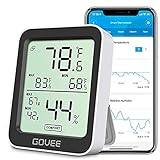
| TempPro TempAir CORE TP49 Indoor Thermometer & Hygrometer (Black, 1-pack (TP49B-1)) | Checking humidity inside a clear dry box or storage bin at a glance. | You want app alerts or logged humidity history. | View on Amazon (opens Amazon in a new tab) |
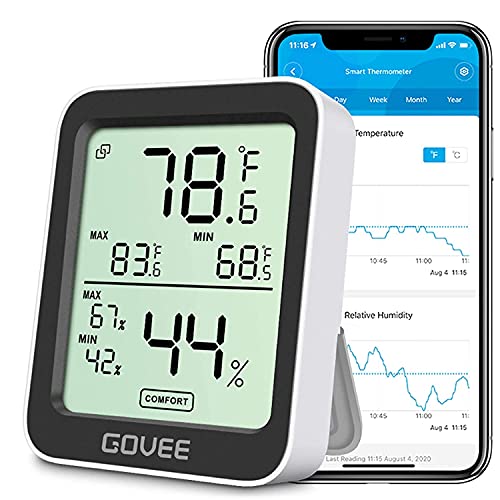
| Govee Bluetooth Hygrometer Thermometer H5075 (1-pack) | Logging humidity inside a larger storage bin or cabinet with phone alerts. | You only need a glance reading and don't want an app. | View on Amazon (opens Amazon in a new tab) |

How we compared them
This is a research-based comparison. Every figure below comes from TempPro's product page and TP-49 instruction manual, and from Govee's product page, all listed in the sources. We haven't measured either unit, so there are no accuracy readings of ours here. Where a maker describes its own product, such as "the most practical and cost-effective indoor hygrometer thermometer," we label it as the maker's claim.
The two makers publish different amounts. TempPro gives a specification list on its page and in its manual. Govee's page has a "Specifications" tab, but its text didn't load in the page we retrieved, so the Govee details here come from the description, the FAQ, and text in Govee's product images, which we label as image text. Neither maker mentions filament, 3D printing, or sealed storage boxes, and neither publishes an accuracy test, so there's no test table on this page.
Side-by-side specs
| TempPro TempAir CORE TP49 | Govee H5075 | |
|---|---|---|
| How you read it | On the LCD only; "Wireless Technology: N" | On the LCD, or in the Govee Home app over Bluetooth |
| Humidity range | 10% ~ 99% | Not published |
| Humidity accuracy | ±2% from 30% to 80%, otherwise ±3% | ±3%RH |
| Temperature range | -58 to 158 °F (-50 to 70 ℃) | Not published |
| Temperature accuracy | ±0.9℉ (±0.5℃) from 32 to 140℉, otherwise ±1.8℉ (±1℃) | ±0.5°F/±0.32°C |
| Sensor | NTC | "Swiss made sensor" |
| Update speed | "Refresh Rate: 10 seconds" | "2s responsive speed" |
| Humidity resolution | 1% (manual) | Not published |
| Comfort icons | Dry, Comfort, Wet faces | "COMFORT" indicator (image text) |
| Max/min readings | Not described | "Max/Min Records" (image text) |
| Alerts | None | App push alerts outside a preset range |
| History | None | 20 days in the app, CSV export |
| Backlight | No | Not published |
| Size | 55.5L × 66.0W × 15.0H mm | 2.5 in × 3.1 in front (image text); thickness not published |
| Display | 36.0 × 39.0 mm LCD | 3.0 inch diagonal (image text) |
| Mounting | Tabletop stand, magnetic back, hanging mount | Stand and hanging hole |
| Power | 1 × AAA, 1.5 V | 2 × AAA, "about 6 months" |
| Warranty | One year (manual); TempPro's page offers three years after registering on TempPro.com | Not stated on the product page |
Humidity accuracy and range
For a dry box, this is what matters most, and TempPro documents more of it.
- TempPro TP49. TempPro lists a "Humidity Range: 10% ~ 99%" and a tolerance of "±2%" from 30% to 80% RH, "Otherwise: ±3%." So a box held below 30% sits in the less accurate band, and anything below 10% is outside the range TempPro states. The product title rounds this to "±2% RH," and the page also says "±2%-3% for humidity."
- Govee H5075. Govee says "humidity is ±3%RH," with no band given and no humidity range published on the page text or images we checked.
Neither maker says how its unit reads in a sealed box with desiccant, or how often to check it against a reference. A few percent either way matters less than the trend, so watch whether the number climbs between desiccant changes. Our filament storage guide covers what to do when it does.
Reading it: glance vs phone
This is the biggest practical difference between the two.
- TempPro TP49. You read the TP49 on its own screen. TempPro's page says the TP49 "requires you to be nearby," has "no backlight," and points buyers who want remote monitoring to its Bluetooth TP358 instead. It shows Dry, Comfort, and Wet faces; its manual says Dry means humidity below 30%, and Comfort means 30% to 60% with the temperature between 68°F and 79°F. In a clear container, you can read it without opening the lid.
- Govee H5075. Govee says the app "pushes you alert notification" when temperature or humidity "goes out of the preset range," and that you can "view 20 days temp and humidity records and export the data to CSV format." Govee's FAQ says the H5075 "only supports Bluetooth connection" and doesn't support Wi-Fi, so the alerts depend on your phone being in Bluetooth range. Text in Govee's product images also lists "Max/Min Records" and a comfort indicator, with Dry below 30% humidity and Comfort from 30% to 60% between 68°F and 78°F.
Govee gives three different Bluetooth range figures:
- Description: "Up to 60m/196ft enabled range."
- FAQ: "a maximum connection range of 50 meters (164 feet) in open, unobstructed environments."
- Two product images: "260ft."
We can't tell which applies to your setup, and a closed box, cabinet, or wall will shorten any of them.
Size and fitting it in a box
Measure the space in your container before you choose.
- TempPro gives the TP49 a unit size of 55.5L × 66.0W × 15.0H mm, with a 36.0 × 39.0 mm display. It can stand, hang, or attach with its magnetic back.
- Govee doesn't give dimensions in its page text. A product image labels the front 2.5 in wide and 3.1 in tall, with a 3.0 inch display, but no thickness. Our catalog record gives 3.11 × 2.56 × 0.75 in, which comes from the Amazon listing, not from Govee. It has a fold-out stand and a hanging hole.
On the figures each maker gives, the TP49 is the smaller of the two. Check either against your box's free space beside the spool, and keep it clear of any feed path or airlock.
Power and battery care
TempPro's manual says the TP49 runs on "1 x AAA 1.5V" and to "Remove battery if stored for more than four months." It also says "Do not immerse product body in water" and not to leave it "exposed to extreme high or low temperatures." TempPro doesn't publish a battery life.
Govee says the H5075 "uses two AAA batteries and lasts for about 6 months."
Warranty
TempPro's manual gives a "Limited One-Year Warranty" against "defects in parts, materials and workmanship." Its product page adds "3-year warranty after registration," and its FAQ says to "Register your product on TempPro.com to activate an extended three year limited warranty," listed among the reasons to buy directly from TempPro. TempPro doesn't say on the page whether that extension applies to units bought elsewhere, so check with TempPro if you buy through Amazon.
Govee's product page doesn't state a warranty term for the H5075.
What each maker says it's for
- TempPro TP49. TempPro sells it for rooms, plants, nurseries, greenhouses, and guitar rooms, and calls it "the best entry-level indoor thermometer hygrometer" for "budget-conscious homeowners." That's TempPro's claim. TempPro also says orders "may arrive in packaging with our previous brand name."
- Govee H5075. Govee says it lets you "Monitor the temperature and humidity of any indoor space", and calls its sensor "Swiss-made" for "fast and accurate readings." Those are Govee's claims.

TempPro TempAir CORE TP49 Indoor Thermometer & Hygrometer (Black, 1-pack (TP49B-1))
- Best for
- Checking humidity inside a clear dry box or storage bin at a glance.
- Skip this if
- You want app alerts or logged humidity history.
Specs, strengths, and limitations
- Capacity
- One digital temperature and humidity monitor
- Maker notes
- TempPro store variant 'Black / 1-Pack' is SKU TP49B-1; the Amazon model number is 'TempAir CORE TP-49-B'. TempPro's page notes orders may arrive in packaging with the previous brand name (the buythermopro.com domain serves the same TempPro store; Amazon lists the brand as TempPro). TempPro: humidity range 10%–99%; accuracy ±2% RH from 30–80% RH, otherwise ±3%. TempPro: temperature range -50 to 70 °C (-58 to 158 °F); accuracy ±0.5 °C from 32–140 °F, otherwise ±1 °C. TempPro: refreshes every 10 seconds; powered by 1 × 1.5 V AAA battery. TempPro: size 55.5 (L) × 66.0 (W) × 15.0 (H) mm; tabletop stand, magnetic back or hanging mount. Not a filament-specific product: TempPro markets it for rooms and greenhouses. Check that it fits inside your box. Warranty: TempPro's manual gives a limited one-year warranty from date of purchase; TempPro's product page offers an extended three-year limited warranty after registering on TempPro.com.
- Manufacturer states humidity accuracy of ±2% RH between 30% and 80% RH.
- Manufacturer states readings refresh every 10 seconds.
- Manufacturer states it can stand, hang, or attach magnetically.
- It only measures humidity; it does not dry filament or the air.
- The display has to be visible through the container wall, or you have to open the box to read it.
- Below 10% RH it is outside the manufacturer's stated humidity range.
Govee Bluetooth Hygrometer Thermometer H5075 (1-pack)
- Best for
- Logging humidity inside a larger storage bin or cabinet with phone alerts.
- Skip this if
- You only need a glance reading and don't want an app.
Specs, strengths, and limitations
- Capacity
- One Bluetooth temperature and humidity monitor
- Maker notes
- Govee model H5075; matches the Amazon model number. Govee: humidity accuracy ±3% RH; temperature accuracy ±0.32 °C; responds in 2 seconds. Govee: powered by two AAA batteries, lasting about 6 months. Govee: Bluetooth only, does not support Wi-Fi; data viewed in the Govee Home app, with 20 days of temperature and humidity records and CSV export from the app. Govee: stand and hanging hole for placement. Not a filament-specific product. Outer dimensions are not stated on Govee's page; the Amazon listing gives 3.11 × 2.56 × 0.75 in. Govee gives three Bluetooth range figures: up to 60 m/196 ft (description), 50 m/164 ft in open, unobstructed space (FAQ), and 260 ft (product images).
- Manufacturer states humidity accuracy of ±3% RH.
- Manufacturer states the app sends alerts when readings leave a preset range and can export data as CSV.
- Manufacturer states battery life of about 6 months on two AAA batteries.
- It only measures humidity; it does not dry filament.
- Bluetooth only (no Wi-Fi), so remote alerts need your phone within Bluetooth range.
- Govee doesn't publish a thickness; its product images show a 2.5 × 3.1 in front, so check it fits inside your box.
Verdict: which should you buy?
Choose the TempPro TP49 if…
- You want a glance reading through a clear dry box, with no app or phone.
- You want a published humidity range and accuracy band, and the smaller published size.
- You want a magnetic back as well as a stand and hanging mount.
Choose the Govee H5075 if…
- You want a phone alert when a box or cabinet gets too humid, and you're usually within Bluetooth range.
- You want 20 days of history and CSV export to see how fast your desiccant wears out.
- You're happy to measure the unit yourself, since Govee publishes no thickness or humidity range.
Safety and limits
How this page was checked
Every figure and feature above comes from TempPro's product page and TP-49 instruction manual and from Govee's product page in the sources section, retrieved on 2026-10-11. We haven't used either unit for this page, so nothing here is a measured result of ours. The Govee size, display size, max/min records, and comfort ranges come from text in Govee's product images. Where a maker contradicts itself (Govee's Bluetooth range, TempPro's warranty), we've reported every figure. The Govee outer dimensions in our catalog come from the Amazon listing we link to, not from Govee. Read more in our editorial standards and affiliate disclosure.
Filament storage: what to check before you buy ↗Sources
- TempPro TempAir CORE TP49 Indoor Thermometer & Hygrometer, TempPro
- TP-49 instruction manual (EN/FR), TempPro
- Govee Bluetooth Hygrometer Thermometer H5075, Govee
This page is research-based: we have not tested the products or methods ourselves. It draws on the manufacturer documentation and sources listed. Exact settings and fit always defer to your printer and filament makers.
Keep reading

Best Filament Storage (2026): Dry Boxes, Vacuum Bags and Hygrometers
The best filament storage by job: dry boxes you can print from, vacuum bags, desiccant, hygrometers and a shelf, with maker specs. None dries wet filament.
Filament storage: sealed containers, desiccant, and moisture exposure
How to keep opened spools dry with sealed containers, the right desiccant and a hygrometer, and why storage cannot fix filament that is already wet.

Filament dryer vs dry box: drying and storage explained
A dry box keeps dry filament dry; a dryer removes moisture that is already in it. How to tell which problem you have, and what to do safely.