Glue stick, Magigoo, or bare plate? Bed adhesives explained
When Prusa, Bambu Lab, Polymaker and Magigoo say to use glue on a build plate, when to print on a bare plate, and how to apply and clean it off.
On this page (12 sections)
Whether to use glue depends on your plate and your filament, and the plate maker's word comes first. On smooth PEI, glue is mostly a release layer: Prusa and Bambu Lab both say PETG can stick so hard to bare smooth PEI that removing it damages the sheet, so they call for glue there. On textured PEI, Prusa says flexible filaments need no glue and Bambu Lab says glue is "generally not necessary", but both say ABS, ASA, PC and nylon need, or may need, glue stick on textured. PLA prints on bare smooth or textured PEI from both makers. Some plates need glue for everything, like Bambu's Engineering Plate, and some need none, like Bambu's Cool Plate SuperTack. Apply a thin layer to a clean, cold plate unless your adhesive's maker says otherwise, let the print cool before removing it, and wash the residue off the way your plate maker says.
Who this guide is for
This guide is for anyone deciding whether to put glue stick, a liquid adhesive like Magigoo, or nothing at all on a build plate. It covers when makers say to use an adhesive, when they say to skip it, how each maker says to apply and clean it, and which products fit. If your print is already welded to the plate, start with print stuck to the bed. If prints won't stick at all, work through first-layer adhesion first, since every maker below starts with a clean plate. For the differences between surfaces themselves, see textured vs smooth build surfaces.
Adhesive or release agent? The same glue does both jobs
Makers use glue for two opposite reasons, and it helps to know which one applies to you.
- To add grip. Magigoo says its datasheet formula is "designed to reduce warping." Creality says glue stick creates "a thin adhesive layer, helping the first print layer stick better to the bed," and that it is "especially useful when printing on materials that tend to warp."
- To stop a print sticking too hard. Prusa calls glue stick a "separation layer." Its surface preparation guide says PETG "has great adhesion to a clean, degreased, smooth PEI sheet, making it extremely hard to remove. Removing the print often leads to peeling off the PEI surface and irreversible damage to the sheet," which is why it recommends "another type of steel sheet or adding PVA glue as a separation layer."
Bambu Lab's filament guide puts both together: glue stick or liquid glue "improves model adhesion, makes prints easier to remove after printing, and helps protect the plate surface."
Magigoo also describes its product as releasing on its own. It says Magigoo Original keeps "parts firmly in place while the bed is hot and releasing them cleanly once it cools."
When do you need glue on a build plate?
These are each maker's instructions for its own plates. Another brand's "smooth PEI" or "textured PEI" may not behave the same, so check the instructions for the plate you own.
| Plate | Maker's glue guidance |
|---|---|
| Prusa smooth PEI sheet | "Some filaments, like PETG, ASA, ABS, and PC Blend, may need a protective separation layer, like gluestick, applied thinly before printing!" Prusa's material table also marks flexible filament "with glue stick" on this sheet. |
| Prusa textured (powder-coated) sheet | "No need for glue-stick with flexible filaments (TPU/TPEE)." "Prints from ASA, ABS, Nylon, and PC Blend require the application of a glue stick (separation layer)." |
| Bambu Lab Smooth PEI Plate | "Only PLA filament does not require glue, while printing with other filaments requires the use of gluing to prevent the PEI sheet from tearing." |
| Bambu Lab Textured PEI Plate | Bambu's glue guide says "it is generally not necessary to apply glue," but glue can reduce adhesion for filament "that has a strong bonding to the plate, like PETG." Its plate guide adds that PC, PA, ABS and ASA "may" need a layer of glue stick. |
| Bambu Lab Engineering Plate | "Before printing with any filament, apply glue on the Engineering Plate." |
| Bambu Lab Cool Plate SuperTack | "No glue required." Bambu says the plate is designed only for PLA and PETG. |
| Bambu Lab Cool Plate (discontinued) | Bambu says it is "only suitable for printing PLA, and glue should be applied before printing." |
Prusa's material table uses three marks for each sheet and material pair: a green check means "Good to go!", a yellow exclamation mark means "Use a separation layer," and a red X means "Do not print! The chosen material may damage your print sheet!" Prusa warns that "Failing to use the separation layer may lead to damaging your sheet!"
Bambu Lab's filament guide also says which glue to use for some engineering materials. It says to use Bambu Lab Glue Stick for "ASA-CF, PA6-GF/CF, PPA-CF, PPS-CF, PET-CF, and PAHT-CF printing," and Bambu Lab Liquid Glue for ABS-GF. Its table marks liquid glue "Not Recommended" for PC and PA, and "Not Compatible" for PET-CF/GF.
When makers say not to use glue, or to skip a material entirely
- PLA on PEI. Bambu Lab says PLA is the one filament that doesn't need glue on its Smooth PEI Plate. Prusa's material table gives PLA a green check, with no separation layer, on its textured and smooth sheets.
- Flexibles on Prusa's textured sheet. Prusa says there is no need for glue stick with TPU or TPEE on it.
- Bambu's Cool Plate SuperTack. Bambu says no glue is required for PLA and PETG, and that "Using any other materials may damage the surface coating." Bambu doesn't offer glue as a way to print other materials on it.
- Combinations Prusa marks with a red X. Glue is not the fix for these. Prusa's table marks PP with a red X on its textured sheet, for example, and nylon with a red X on its smooth PEI sheet.
- Other adhesives on Prusa sheets. Prusa says to check any other separation material or adhesive against its sheets, and that "ABS juice should not be used in combination with textured or satin sheets."
Do you need glue for PETG on PEI?
Prusa calls PETG on smooth PEI its "most common" example of a pairing that needs a separation layer. Prusa's PETG guide says, "Do not print on the smooth PEI sheet as the adhesion may be too strong! If you decide to use the smooth PEI sheet anyway, apply a glue stick on it before printing." It recommends a powder-coated textured or satin sheet for PETG instead. Bambu Lab's rule for its Smooth PEI Plate, glue for everything except PLA, covers PETG too.
Makers disagree about PETG on textured PEI:
- Prusa says its textured sheet is "perfect when printing a lot of high-adhesion filaments like PETG," and doesn't list PETG among the materials that need glue on it.
- Bambu Lab says glue on its Textured PEI Plate is generally not needed, but that a PETG model "may be difficult to remove," and glue can then be applied to reduce adhesion.
- Polymaker, writing about PET materials including PETG and PET-GF, says bare printing on textured PEI "guarantees damage on removal" and to "Always start with a glue stick barrier." For CoPE on textured PEI, it says "a release agent is required."
If you print PETG on a textured plate, follow your plate maker first, then check whether your filament maker says anything stricter. For other PETG issues, such as stringing and blobs, see our PETG problems guide.
How to apply it
Every maker starts with a clean plate. Bambu Lab says to "make sure the surface of the build plate is clean, dry and free of grease." Prusa says to degrease with "isopropyl alcohol (90% or stronger) or denatured ethyl alcohol on the cold print surface" and an unscented paper towel, and not to use skin-care products because "they usually contain oils that ruin adhesion!" Bambu Lab cleans its textured plates with detergent and water instead. The print stuck to the bed guide covers each maker's plate cleaning in full.
Glue stick (Prusa, Bambu Lab, Creality)
- Prusa: "Usually, only a thin layer of glue is enough." A thick layer "may leave various unsightly traces, bumps, and artifacts" on the print, though for a mechanical part "making the layer slightly thicker won't hurt." Because PVA glue "melts at relatively low temperatures," Prusa suggests applying it on a cold surface. On a smooth sheet, Prusa says you can spread glue only under the print, using the printed grid to find the spot.
- Bambu Lab: "Apply glue before you start printing," and "Apply glue evenly and apply appropriate pressure."
- Creality: Apply the glue stick "evenly across the surface of the print bed," covering "the entire area where the print will be placed," then "let the glue dry for a few minutes before starting the print." Creality also says "a thin, even layer of glue is often enough."
Magigoo Original (liquid, pen applicator)
Magigoo's product page says to "Shake the bottle for 3–5 seconds. Press the nib against the bed to activate the spring valve. Spread one thin, even layer across the print area." It adds that "It's best to apply Magigoo when the bed is still cold, though it also works on a hot bed," and that there is "No drying time needed."
Magigoo's FAQ says not to squeeze the bottle, because "Squeezing risks the applicator popping off," and recommends "applying Magigoo before every print." Its datasheet says "the best and most reliable performance is achieved when applied as a thin layer," so cleaning and re-applying between prints is recommended, "especially on longer prints or hard to print with materials."
Makers disagree on thickness and drying
- Thickness. Prusa, Creality and Magigoo all favor a thin layer, and Magigoo's FAQ warns that "a heavy layer can actually reduce adhesion." Bambu Lab says the opposite about its own liquid glue: "a thick coat provides significantly stronger adhesion than a thin coat," with "Four coats" giving the best adhesion.
- Drying. Creality says to let glue stick dry for a few minutes. Magigoo says no drying time is needed. Bambu Lab says its liquid glue only needs to have "dried into a film" and that the bed's preheat is enough to dry it. Polymaker says to "dry completely."
Each instruction is written for that maker's own product, so follow the one for the adhesive in your hand.
Bed temperature with an adhesive
Use your filament maker's bed temperature first. Magigoo's datasheet says "It is recommended to print according to the printing temperatures recommended by the filament supplier," and gives its own table only as a fallback.
Magigoo's own published ranges don't match each other. Its datasheet lists PLA at 40–70 °C and PETG at 80–100 °C. Its current product page lists PLA at 50–70 °C and PETG at 70–90 °C. The printed instructions list PLA at 40–60 °C and PETG at 60–85 °C. The datasheet and product page both say to start at the lower end and raise in 5 °C steps. If prints stick too well, Magigoo's FAQ says the "Bed is likely too hot" and suggests lowering it in 5–10 °C steps.
Bambu Lab publishes bed temperatures for each filament and glue pairing in its filament guide. For example, it lists PETG at 60–80 °C with glue stick or liquid glue.
Removing the print
Let the plate cool. Magigoo says "a drop of around 30–40°C from your printing temperature is usually enough for the part to release on its own." Bambu Lab recommends waiting for the plate to cool down before removing the model, then to "gently flex it to release the model." Prusa says to remove prints by "removing and bending the sheet only after they are cooled down."
Prusa notes that glue leaves marks on its PVA layer after you remove a PETG print, and that "these marks are normal as they are only on a PVA glue layer and not on the print sheet surface." If the bottom of your print turns white, Bambu Lab's Engineering Plate FAQ says this "is usually caused by the solidification of glue or glue stick residue during heating," and to wipe it with "a cleaning agent or alcohol."
How do you clean glue off a build plate?
The adhesive maker and the plate maker both have a say here. If they conflict, the plate maker's limits come first, because the cleaner touches their coating. Our build plate cleaning guide covers each plate maker's method and glue residue removal in more detail.
- Magigoo: "Clean with a damp cloth. No chemicals or scraping needed." The instructions say to clean "the cool printing bed by wiping it with a damp cloth. Use just water."
- Bambu Lab glue stick: "Glue stick can be cleaned with water and soap. If the glue is dry, let the plate soak in water for about 30 seconds before washing it away."
- Bambu Lab liquid glue: "Rinse with water and scrub with a non-woven cloth to remove it completely." Bambu Lab also says that if there is "a lot of glue residue," to clean the plate before the next print.
- Creality glue stick: Creality says to heat the bed slightly, "Use a plastic scraper or spatula to gently scrape off the residue," then wipe with a damp cloth, using "a mild solvent such as isopropyl alcohol" for stubborn residue, and make sure the bed is "completely dry" before printing.
- Polymaker: "a quick isopropyl wipe removes agent residue."
Check your plate's limits before you soak or scrub it. Prusa says its textured sheet "is not waterproof" and treats washing it in warm water with dish soap as "a last resort, which should not be done often." Prusa says not to use metal spatulas on that sheet. Prusa, Bambu Lab and Polymaker all say not to use acetone on textured PEI.
Which products fit
Both products below are general-purpose adhesives. Magigoo names the surfaces it designed and tested Magigoo Original on, and Creality names none, so check your plate maker's glue guidance first.
Magigoo Original
Magigoo's product page says Magigoo Original was "designed and extensively tested on glass build plates" for PLA, ABS, PETG, HIPS and TPU, and lists ASA as working "with some ASA filament brands." Its datasheet says it "also works when applied on sheets e.g. Kapton, PEI and similar." It cleans off with water, according to Magigoo. For nylon, polycarbonate and polypropylene, the datasheet says Magigoo makes separate "specialty" formulations, so Magigoo Original isn't the one for those.

Magigoo (Thought3D) Magigoo Original 3D Printing Adhesive (50 mL pen applicator (Amazon model MO2016))
- Best for
- Glass or smooth beds where PETG sticks too hard or ABS warps at the corners.
- Skip this if
- Your plate maker advises against adhesives, or you print nylon, PC, or PP.
Specs, strengths, and limitations
- Maker notes
- Magigoo datasheet v1.5: water-based ('Solvent: water'); intended 'on FDM/FFF 3D printers with a heated bed on aluminium, glass surfaces. Also works when applied on sheets e.g. Kapton, PEI and similar', for PLA, ABS, HIPS, PETG, and TPU. Datasheet bed temperatures: ABS 90–110 °C, PLA 40–70 °C, PETG 80–100 °C, HIPS 90–115 °C, TPU 30–60 °C. The current product page lists slightly different 'optimised' ranges (for example PLA 50–70 °C, PETG 70–90 °C), so follow your filament maker's settings. The product page also lists ASA as 'Compatible' (90–110 °C): 'Works with some ASA filament brands. Better suited for glass build plates.' Magigoo's printed instructions give a third set of bed temperatures (PLA 40–60 °C, ABS 90–110 °C, PETG 60–85 °C, HIPS 90–110 °C). Magigoo states prints release once the bed cools by about 30–40 °C, and that it cleans with water. This is a liquid adhesive in a valved pen applicator, not a solid glue stick. The 50 mL volume comes from the Amazon title. The Magigoo page doesn't state a volume.
- Manufacturer states it holds parts while the bed is hot and releases them as it cools.
- Manufacturer datasheet lists PLA, ABS, PETG, HIPS, and TPU, on glass and aluminium beds and on PEI or Kapton sheets.
- Manufacturer states it is water-based and cleans off with water.
- Magigoo's current product page says it was 'designed and extensively tested on glass build plates'. The datasheet says it 'also works' on PEI. Check your build plate maker's guidance before using any adhesive on PEI.
- Not for nylon, PC, or PP. Magigoo makes separate formulas for those.
Creality Glue Stick for Build Plate
Creality's store page lists the stick at 21 g, for "PLA/ABS/PETG/PC/PA/TPU." Creality's glue stick guide says it is made of PVP. Creality gives application and cleaning steps in that guide, but no list of compatible build surfaces. Prusa's surface preparation guide names PVA glue stick as its separation layer, and Bambu Lab discourages third-party glues on its plates, so check your plate maker's guidance before using a PVP stick.
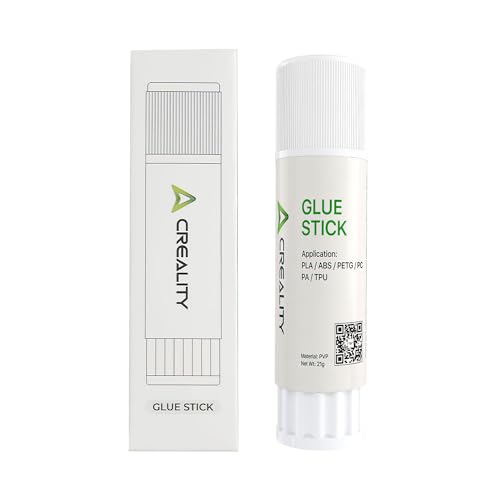
Creality Glue Stick for Build Plate (1 stick, 21 g)
- Best for
- A cheap release layer or adhesion aid on glass or smooth plates, or for PETG release on PEI where the plate maker allows it.
- Skip this if
- Your plate maker says not to use glue on it.
Specs, strengths, and limitations
- Maker notes
- Creality store: 'Capacity: 21g'; 'Application: PLA/ABS/PETG/PC/PA/TPU'. Creality's blog describes this glue stick as 'Made from high-quality PVP material.' The Amazon listing (1 Pack) adds that it cleans off with water once the plate cools. 21 g comes from Creality's store page. A 4-pack is a separate ASIN (B0D3XLHVLZ).
- Manufacturer states it keeps steady adhesion so models don't come loose or warp.
- Manufacturer lists PLA, ABS, PETG, PC, PA, and TPU as applications.
- Creality's page gives no build-surface guidance. Check your build plate maker's advice before using glue on textured or smooth PEI.
- Small 21 g stick, per Creality.
For other print-removal and maintenance tools, see our 3D printing tools shortlist.
When a plate change beats an adhesive
Glue can be a workaround for the wrong plate. Prusa's answer to PETG on smooth PEI is first "another type of steel sheet," with glue as the alternative. Bambu Lab says that instead of gluing, "we provide textured PEI Plates that allow you to print without the need for a glue stick." If you print mostly PETG or TPU and keep reaching for glue on a smooth plate, a textured plate made for your exact printer may be the simpler fix. Our build plates shortlist covers plates by printer, and textured vs smooth build surfaces explains the trade-offs.
Quick checklist
- Look up your plate maker's guidance for your filament: glue required, optional, or not allowed.
- If it's not allowed, change the plate. Don't add glue.
- Clean the plate the way its maker says, and keep fingers off the print area.
- Apply the adhesive the way its maker says, usually a thin, even layer on a cold plate.
- Use your filament maker's bed temperature.
- Let the plate cool, then flex it to release the print.
- Wash the residue off with the method both makers allow.
Sources
- Print surface preparation, Prusa Research
- Smooth steel sheet, Prusa Research
- Textured steel sheet, Prusa Research
- Flexible steel sheets (guidepost), Prusa Research
- PETG material guide, Prusa Research
- Filament Material Guide (material table), Prusa Research
- Introduction to Bambu Lab Build Plates, Bambu Lab
- How to Use Bambu Lab Glue, Bambu Lab
- Filament guide: printer, nozzle, AMS, build plate, glue compatibility and required parameters, Bambu Lab
- Bambu Lab Textured PEI Plate Cleaning Guide, Bambu Lab
- Magigoo Original, Magigoo (Thought3D)
- Magigoo 3D Printing Adhesive Technical Data Sheet v1.5, Magigoo (Thought3D)
- Magigoo Original instructions, Magigoo (Thought3D)
- Magigoo support and FAQs, Magigoo (Thought3D)
- Creality Glue Stick For Build Plate, Creality
- Glue Stick for 3D Printing: What, Why and How, Creality
- Print Sticking Too Well to Build Plate, Polymaker
This page is research-based: we have not tested the products or methods ourselves. It draws on the manufacturer documentation and sources listed. Exact settings and fit always defer to your printer and filament makers.
Keep reading

Textured vs Smooth Build Surfaces: Compatibility and Release Considerations
How smooth and textured PEI differ in finish, adhesion, release, and cleaning, and why plate fit depends on your exact printer model.
Print stuck to the bed or tearing the build plate
Why PETG and TPU can bond too hard to smooth PEI, which plate and filament pairings makers warn against, and how to free a stuck print without ruining a plate.
First-layer adhesion: surface, calibration, and material checks
Diagnose first layers that won't stick, lift at the corners, or look over-squished: clean the surface, check Z offset, then the material.