Silica gel and desiccants for filament storage
Storage humidity targets from filament makers, and how desiccant makers say to read, size and recharge indicating silica gel, checked with a hygrometer.
On this page (10 sections)
Silica gel only works in a sealed space, and it has to be dry to do its job. Filament makers don't agree on a single humidity target: Bambu Lab's PLA Basic data sheet says to print and store it below 20% RH, sealed with desiccant, while UltiMaker says to keep its moisture-sensitive materials below 50% RH and that most of its materials store best at about 10 to 30% RH. Indicating silica gel tells you when it's spent by changing colour: Dry & Dry and Polymaker describe orange turning dark green, while Bambu Lab's own pages describe yellow beads turning purple or green. Recharge it only by its own maker's instructions, because the temperatures differ: Dry & Dry's loose beads go up to 250 °F (121 °C), its aiwa packets to 200 °F (93 °C), and Bambu Lab says not to exceed 100 °C for its AMS desiccant. Put a hygrometer in the box so you can see whether the desiccant is keeping up.
Who this guide is for
This guide is for anyone who already keeps spools in a sealed bin, bag or dry box and wants to know how much desiccant to use, how to read it, and how to recharge it safely. It's the desiccant detail behind our filament storage guide, which covers container types, desiccant types such as molecular sieve, and labelling. Desiccant slows moisture uptake but doesn't dry a wet spool. If your prints already pop or string, start with how to tell if your filament is wet and dryer vs dry box.
What filament makers say about storage humidity
Makers publish different targets, and some publish none. These are each maker's figures for its own materials.
| Maker | What it says |
|---|---|
| Bambu Lab (drying wiki) | Typical indoor air is "usually 45% |
| Bambu Lab (PLA Basic data sheet) | Lists "Printing and Storage Humidity" as under 20% RH, "(Sealed with desiccant)". |
| Bambu Lab (drying table, per material) | Its "Desiccant Protection During Use" column marks PLA Wood, TPU, PC, PVA, PA-based and PET-CF filaments as "Required"; ASA-CF and ABS-GF as "Recommended"; and PLA Basic, PETG, ABS and ASA as "Not required but recommended". |
| UltiMaker | "For moisture-sensitive materials (PVA, Nylon, Nylon CF Slide, TPU 95A), keep relative humidity below 50% to prevent moisture uptake." And: "In practice, most UltiMaker materials are optimally stored at approximately 10–30% relative humidity." |
| UltiMaker (Material Station) | The station's target "is 25% on S series and 15% on Factor 4," and it warns only "if the internal relative humidity is over 40% for an extended period of time." |
| Prusa Research | Gives no RH figure. It says to store filament "in a closed space or box, with some desiccant material in it," and that polyamide must be kept "airtight with desiccant." |
| Polymaker | Gives no storage RH target. After drying, it says to keep filament "in airtight bags or dry boxes with desiccant, or use vacuum containers." |
Makers also disagree on how far down to go. Bambu Lab says lower humidity keeps filament dry longer. UltiMaker says "Extremely low humidity levels (for example, close to 0–1%) are not required to prevent moisture absorption and do not provide significant additional benefit compared to typical dry-storage conditions." If your filament maker publishes a figure, use theirs. If it doesn't, Bambu Lab's under 20% RH is the lowest upper limit any maker above gives for storage.
How do you know when silica gel is spent?
Plain silica gel gives you no visual cue. Dry & Dry says that "Even When fully Saturated, the Material still Looks and Feels Dry." Indicating gel mixes in beads that change colour, and the colours depend on the product:
- Dry & Dry loose beads (2 lb): "Contains 100% Orange Beads." "Orange beads turn to Dark Green when absorb moisture and saturated." Dry & Dry says they "do not contain cobalt chloride."
- Dry & Dry 5 g aiwa packets: a "MIXTURE OF WHITE SILICA GEL BEADS WITH FEW ORANGE INDICATING BEADS," reading "Orange(Dry) to Dark Green(Saturated)." Only a few beads in each packet change colour.
- Polymaker PolyDryer desiccant: "orange when dry and dark green when wet." Polymaker says to dry it "When you notice the most of desiccant has changed color from orange to dark green." It adds that first-batch PolyDryers had different colours.
- Bambu Lab AMS silica gel: Bambu's two wiki pages describe it differently. Its desiccant page says "the internal yellow beads will gradually turn purple," and to replace or dry the pack "If the beads appear predominantly purple." Its drying page says the yellow beads "will gradually turn green" and to act "If the entire pack appears dark green." Both pages say the beads can be reused once they return to orange.
- Bambu Lab molecular sieve desiccant: when saturated, Bambu says "the orange color-changing silica gel will turn dark purple, and the white molecular sieve will also turn brown."
Use the colour chart for the desiccant you actually own. Don't assume another maker's colours apply.
How much silica gel do you need for filament?
Few makers give a quantity. Dry & Dry is the only desiccant maker here that publishes a sizing table, and it says the figures are a "general estimate when used in an air-tight sealed container." The amount depends on what you're storing and on the container's volume and condition.
| Container volume (Dry & Dry) | Silica gel |
|---|---|
| 120 cubic inches | 1 g |
| 240 cubic inches | 2 g |
| 360 cubic inches | 3 g |
| 600 cubic inches | 5 g |
| 5 gallon bucket | 10 g |
| 2 cubic feet | 30 g |
| 4 cubic feet | 60 g |
| 8 cubic feet | 120 g |
Dry & Dry adds: "We always recommend placing extra packets than recommended to cover the factors mentioned above and for extra protection." Measure your bin's inside volume and round up.
Other makers state amounts only for their own containers:
- Polymaker ships the PolyDryer Box with "30g Color Changing Silica Gel Desiccant" in a combined hygrometer and desiccant box.
- Bambu Lab says "two packs of desiccant can be placed under the roller" of the AMS HT. For the AMS and AMS 2 Pro, it says where to put desiccant but not how much.
- SainSmart's storage kit includes 15 desiccant packs and 15 humidity cards for 10 bags. SainSmart doesn't say how many packs go in each bag.
- Prusa and UltiMaker give no desiccant quantity for home storage.
Where to put it
Dry & Dry says silica gel packets "work in air-tight seal container. If they are open to air, they are constantly absorbing moisture in open air and become saturated right away." Keep the lid closed as much as you can.
Loose beads need a holder. Bambu Lab says to put dried beads "into a suitable gauze bag or breathable pouch before putting them back into the AMS," and to take its packs out of their sealed plastic bag before use. Polymaker's manual says "DO NOT place loose desiccant at the bottom of the PolyDryer™ Box." Use the desiccant box instead, and remove it from the PolyDryer Box when filling or changing the desiccant.
When should you recharge or replace silica gel?
The colour change is the main signal, but some makers also give a humidity threshold:
- Dry & Dry: place a humidity indicator card in the container. "When the humidity level is 30% in the indicating card, it is time to recharge or change the packets."
- SainSmart: "If the humidity level rises above 50%, It is recommended to change the desiccants."
- Bambu Lab: replace or dry its silica gel when the pack turns mostly purple (or dark green, depending on which Bambu page you read).
Dry & Dry and SainSmart disagree by 20 points. If you store filament whose maker asks for under 20% RH, Dry & Dry's 30% trigger is the closer of the two.
Dry & Dry says there is "no set shelf life for silica gel packets." Bambu Lab says its silica gel "can typically be regenerated 5–15 times," and to replace it "if color change becomes slow or if the beads begin to crack." Dry & Dry notes that "Effectiveness may gradually decrease after multiple reactivation cycles."
Recharging: each maker's own method
These instructions are not interchangeable. Each one is written for that maker's desiccant and packaging, and the temperatures don't agree.
| Desiccant | Maker's method |
|---|---|
| Dry & Dry loose beads | Oven, "Regular Bake (NOT Convection Bake)," 200–250 °F (93–121 °C) for 0.5–2 hours. "Don't use over 250F in the Oven." Or microwave on DEFROST: "About 10 Minutes" on the product page, "Approximately 7 – 12 minutes" in the FAQ. |
| Dry & Dry aiwa packets (5 g) | "Oven Only," regular bake, 150–200 °F (65–93 °C) for 0.5–1.5 hours. "Do NOT microwave Aiwa packets." |
| Polymaker PolyDryer desiccant | On the Dry Dock (no filament in the box) at power level 3 for about 8 hours. Or in a heat-resistant container in an oven "at 100-120°C for 1-2 hours." Or in a microwave on a low power level for 30 seconds, flip, then another 30 seconds, "until the desiccant turns orange." |
| Bambu Lab AMS silica gel, oven | 80–90 °C. Lightly damp: 1–2 hours. Fully saturated: 2–3 hours. "Do not exceed a drying temperature of 100°C, as overheating may damage the silica-gel structure." |
| Bambu Lab AMS silica gel, printer bed | Preheat the heatbed to 80 °C for 10 minutes, then dry for 3–4 hours. Bambu says you can flip the desiccant every half hour. Bambu's drying page lists the X1, X1C and P1S; its desiccant page says enclosed printers. |
| Bambu Lab AMS silica gel, AMS HT | Select 85 °C on the AMS HT's drying function for 3–4 hours. |
| SainSmart desiccant packs | No method given. SainSmart says only that its humidity cards "can be reused after drying with an oven or hair dryer." |
The makers disagree on temperature. Polymaker's oven range, 100–120 °C, starts where Bambu Lab's ceiling ends, and Dry & Dry's bead limit of 250 °F is about 121 °C. Dry & Dry also gives its aiwa packets a lower range than its loose beads. Dry & Dry says aiwa paper is "a special type of paper," so the packets "can only be reactivated via oven and not microwave." Follow the instructions for the product in your hand, not the highest number you've seen.
Start short and check. Dry & Dry says to "Start with shorter time and increase gradually if necessary," and to check the beads' colour periodically. Polymaker and Bambu Lab both say to stop when the desiccant has turned back to orange.
These methods are for desiccant only. Bambu Lab says "Do not use a microwave oven or a kitchen oven to dry filaments." See dryer vs dry box for filament drying.
After recharging, Bambu Lab says to put desiccant you won't use straight away "into an airtight bag right after drying to prevent moisture absorption."
How a hygrometer fits in
Desiccant colour tells you about the desiccant. A hygrometer tells you about the air around the spool. Bambu Lab says that after drying, filament "must be stored in a sealed container or AMS with desiccants during use," and that "A hygrometer can be used to monitor the actual humidity level."
Check the bottom of the range before you trust a low reading:
- Polymaker's PolyDryer hygrometer: "The minimum readout on the hygrometer is 10% - it will not display lower than that."
- TempPro TP49: TempPro gives a humidity range of 10%–99%, with a tolerance of ±2% from 30% to 80% and ±3% otherwise.
- Govee H5075: Govee says humidity "is ±3%RH," and that its app pushes an alert "When the temp or humidity goes out of the preset range." Govee's product page doesn't give a humidity range.
At the 20% RH level Bambu Lab cites, a ±3% sensor could be reading anywhere from 17% to 23%. Our TempPro TP49 vs Govee H5075 comparison sets the two hygrometers side by side. Our filament storage guide covers checking a hygrometer with the saturated salt test.
Humidity indicator cards are a cheaper alternative. Dry & Dry says its cards "do not work well in open air," and that when first opened, "If you wait for about 30 minutes, the card will calibrate." SainSmart says its cobalt-free cards cover "10%~60%," and that the current humidity is the spot that has turned grey, "between brown and light blue."
Polymaker gives one data point for what a dry box can reach. In its own test, PLA, PETG and PC spools left out for 2 weeks at 20 °C and 60% RH were dried in the PolyDryer at the recommended power level for twice the drying time. The final humidity was 20–30% at power level 1, 15–25% at level 2, and 10–20% at level 3. Polymaker says the results are "for reference only."
Which products fit
Each product below comes with its maker's own instructions, which are the ones to follow. None of them dries filament.
Dry & Dry orange indicating silica gel beads (2 lb)
Loose orange beads, all of them indicating, so the whole batch shows its state. Dry & Dry lists 3D filament among the uses and gives the oven and microwave methods above. You need your own breathable pouch or container for them.

Dry & Dry Premium Orange Indicating Silica Gel Desiccant Beads (1 quart, 2 lb net, 3–5 mm beads)
- Best for
- Refilling desiccant in dry boxes, bins, or vacuum bags.
- Skip this if
- You want pre-filled packets or a sealed container rather than loose beads.
Specs, strengths, and limitations
- Capacity
- 1 quart volume, 2.0 lb net weight of 3–5 mm beads (Dry & Dry)
- Maker notes
- Dry & Dry: 100% orange beads that turn dark green when they absorb moisture and are saturated; no cobalt chloride. Dry & Dry: reactivate in an oven for 0.5–2 hours at 200–250 °F, or in a microwave for about 10 minutes on DEFROST; 'Don't use over 250F in the Oven.' Dry & Dry lists 3D filament among the uses and marks the product 'NOT FOR FOOD'. Loose beads: they need a container or breathable pouch inside the storage box. The Amazon listing says beads change colour at 50–60% absorption; the manufacturer page says only that they turn dark green when saturated.
- Manufacturer states the beads change from orange to dark green as they absorb moisture.
- Manufacturer states the beads can be reactivated in an oven or microwave.
- Manufacturer states the beads contain no cobalt chloride.
- Loose beads, not packets: you need your own container or pouch.
- Manufacturer warns not to exceed 250 °F in the oven when reactivating, and marks the product not for food.
Dry & Dry 5 g orange indicating packets (50)
Ready-made packets for bags and small boxes. Each one is 5 g, which Dry & Dry's table matches to a 600 cubic inch container. Only a few beads in each packet change colour, and Dry & Dry says they recharge in an oven only.

Dry & Dry 5 Gram Aiwa Orange Indicating Silica Gel Packets (50 packets × 5 g)
- Best for
- Dropping small pre-filled packets into vacuum bags, dry boxes or AMS-style units.
- Skip this if
- You prefer loose beads to refill a desiccant container.
Specs, strengths, and limitations
- Capacity
- 50 packets of 5 g silica gel (Dry & Dry '5g 50 aiwa' variant)
- Maker notes
- Dry & Dry store variant '50 Packet' is SKU '5g 50 aiwa'; the Amazon model number is DD5G50-AIWA. Dry & Dry: a mixture of white silica gel beads with a few orange indicating beads; orange means dry, dark green means saturated; no cobalt chloride. Dry & Dry: 'Packets are rechargeable via oven only (do not use microwave); Bake the packets at 150 to 200 F for 0.5 to 1.5 hours.' Dry & Dry: packets ship in a resealable self-standing bag. The Amazon listing gives a 1.75 × 2.5 in packet size and coverage of about 600 cubic inches per packet; Dry & Dry's own page does not state either figure, so they are not recorded as specifications.
- Manufacturer states the orange beads turn dark green when the packet is saturated.
- Manufacturer states the packets can be recharged in an oven at 150–200 °F for 0.5–1.5 hours.
- Manufacturer states the silica gel contains no cobalt chloride.
- Desiccant only slows moisture uptake in a sealed container; it does not dry wet filament.
- Manufacturer says recharge in an oven only, never a microwave, and only a few beads in each packet change colour.
TempPro TP49 hygrometer
A simple display for a clear bin. TempPro gives ±2% RH from 30% to 80% and ±3% otherwise, and a 10% floor.

TempPro TempAir CORE TP49 Indoor Thermometer & Hygrometer (Black, 1-pack (TP49B-1))
- Best for
- Checking humidity inside a clear dry box or storage bin at a glance.
- Skip this if
- You want app alerts or logged humidity history.
Specs, strengths, and limitations
- Capacity
- One digital temperature and humidity monitor
- Maker notes
- TempPro store variant 'Black / 1-Pack' is SKU TP49B-1; the Amazon model number is 'TempAir CORE TP-49-B'. TempPro's page notes orders may arrive in packaging with the previous brand name (the buythermopro.com domain serves the same TempPro store; Amazon lists the brand as TempPro). TempPro: humidity range 10%–99%; accuracy ±2% RH from 30–80% RH, otherwise ±3%. TempPro: temperature range -50 to 70 °C (-58 to 158 °F); accuracy ±0.5 °C from 32–140 °F, otherwise ±1 °C. TempPro: refreshes every 10 seconds; powered by 1 × 1.5 V AAA battery. TempPro: size 55.5 (L) × 66.0 (W) × 15.0 (H) mm; tabletop stand, magnetic back or hanging mount. Not a filament-specific product: TempPro markets it for rooms and greenhouses. Check that it fits inside your box. Warranty: TempPro's manual gives a limited one-year warranty from date of purchase; TempPro's product page offers an extended three-year limited warranty after registering on TempPro.com.
- Manufacturer states humidity accuracy of ±2% RH between 30% and 80% RH.
- Manufacturer states readings refresh every 10 seconds.
- Manufacturer states it can stand, hang, or attach magnetically.
- It only measures humidity; it does not dry filament or the air.
- The display has to be visible through the container wall, or you have to open the box to read it.
- Below 10% RH it is outside the manufacturer's stated humidity range.
Govee H5075 Bluetooth hygrometer
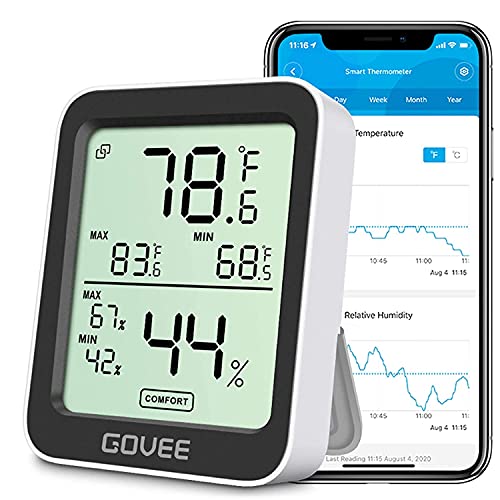
A Bluetooth hygrometer for when you want app alerts and history. Govee gives ±3% RH, alerts when readings leave a preset range, and 20 days of records you can export to CSV.
Govee Bluetooth Hygrometer Thermometer H5075 (1-pack)
- Best for
- Logging humidity inside a larger storage bin or cabinet with phone alerts.
- Skip this if
- You only need a glance reading and don't want an app.
Specs, strengths, and limitations
- Capacity
- One Bluetooth temperature and humidity monitor
- Maker notes
- Govee model H5075; matches the Amazon model number. Govee: humidity accuracy ±3% RH; temperature accuracy ±0.32 °C; responds in 2 seconds. Govee: powered by two AAA batteries, lasting about 6 months. Govee: Bluetooth only, does not support Wi-Fi; data viewed in the Govee Home app, with 20 days of temperature and humidity records and CSV export from the app. Govee: stand and hanging hole for placement. Not a filament-specific product. Outer dimensions are not stated on Govee's page; the Amazon listing gives 3.11 × 2.56 × 0.75 in. Govee gives three Bluetooth range figures: up to 60 m/196 ft (description), 50 m/164 ft in open, unobstructed space (FAQ), and 260 ft (product images).
- Manufacturer states humidity accuracy of ±3% RH.
- Manufacturer states the app sends alerts when readings leave a preset range and can export data as CSV.
- Manufacturer states battery life of about 6 months on two AAA batteries.
- It only measures humidity; it does not dry filament.
- Bluetooth only (no Wi-Fi), so remote alerts need your phone within Bluetooth range.
- Govee doesn't publish a thickness; its product images show a 2.5 × 3.1 in front, so check it fits inside your box.
Polymaker PolyDryer Box
A sealed box for one spool up to 1 kg, with its own hygrometer and a desiccant box holding 30 g of colour-changing silica gel. Polymaker says that desiccant can be recharged by putting the box on the separately sold Dry Dock.

Polymaker PolyDryer Box (Single storage box, no Dry Dock (PX01003))
- Best for
- Keeping a dried 1 kg spool sealed and feeding it straight to the printer.
- Skip this if
- Your spools are wider than 78 mm or larger than 1 kg.
Specs, strengths, and limitations
- Capacity
- One spool up to 1 kg; maximum 205 mm diameter × 78 mm (filament with spool), per the PolyDryer user manual
- Outer size
- 235 × 120 × 235 mm
- Maker notes
- Polymaker SKU PX01003 = PolyDryer Box (Only Storage Box); matches the Amazon model number. Manual packing list for the Box: PolyDryer Box, spool roller, 50 cm PTFE tube, hygrometer & desiccant box, 30 g colour-changing silica gel desiccant, 2 airlocks. The Dry Dock and power adapter are not included. Manual: Box product size 235(L) × 120(W) × 235(H) mm; maximum capacity 205 mm diameter × 78 mm (filament with spool). Desiccant turns from orange (dry) to dark green (wet). The manual says to regenerate it on the Dry Dock at power level 3 for about 8 hours (no filament in the box), in an oven at 100–120 °C for 1–2 hours, or in a microwave on low power for 30 seconds, flip, then another 30 seconds. Manual: 'DO NOT place loose desiccant at the bottom of the PolyDryer™ Box.' The hygrometer uses a 1.5 V LR44 battery; the Polymaker FAQ says its minimum readout is 10%. Filament diameters 1.75 / 2.85 / 3.00 mm. Manual: 'Feed the filament through the outlet plug'; Polymaker's image says 'Ready to print without ever opening the box.'
- Manual has you feed the filament through the box's outlet plug and refit the airlocks tightly after drying, so you can print from the sealed box.
- Manual lists a built-in hygrometer and 30 g of colour-changing silica gel desiccant.
- Manufacturer states the box docks onto the separately sold PolyDryer Dry Dock for active drying.
- Polymaker's manual lists a maximum spool size of 205 mm diameter × 78 mm, so wider spools will not fit.
- Storage only: it does not heat. Drying needs the separately sold Dry Dock.
SainSmart eVacuum filament storage kit
Ten vacuum bags with desiccant packs and humidity cards you can read without opening the bag. SainSmart gives no recharging method for its packs, so plan to replace them or use packets whose maker does give one. If you're deciding between bags and a box, see SainSmart eVacuum bags vs Polymaker PolyDryer Box.

SainSmart eVacuum Sealed Bags Filament Storage Kit (1-spool size: 10 bags (15.75 × 11.81 in), hand pump, 15 desiccants, 15 humidity cards (SKU 101-91F-400))
- Best for
- Sealing up to 10 single spools with a visible humidity card in each bag.
- Skip this if
- You want an electric pump or need bags for 2–3 kg spools.
Specs, strengths, and limitations
- Capacity
- 10 bags, 15.75 × 11.81 in, one spool per bag (SainSmart '1 spool' variant)
- Maker notes
- SainSmart lists the '15.75"×11.81" (1 spool)' variant as SKU 101-91F-400; the Amazon model number is 400256525. Title, brand and contents match. SainSmart package list: hand pump × 1, vacuum bag × 10, sealing clip × 2, desiccant × 15, humidity indicator card × 15. SainSmart: micro-porous vacuum bags, reinforced double-seal zipper, self-sealing heavy-duty valve. SainSmart: cobalt-free humidity indicator cards with a 10%–60% range; spots change from brown to light blue as humidity rises. If humidity rises above 50%, SainSmart recommends changing the desiccants. SainSmart: the humidity indicator cards can be reused after drying with an oven or hair dryer. No regeneration method is given for the desiccant packs. SainSmart FAQ: manual pumping is slow; squeeze out some air before pumping. SainSmart also sells a larger 15.75 × 15.75 in (2-spool) variant (SKU 101-91F-VS4040), which is not this listing. SainSmart's line 'It can be adapted to 0.5KG/0.75KG/1KG package of 1.75mm/2.85mm/3mm filaments' follows both bag sizes and does not say which weights fit which size.
- Manufacturer package list includes 15 humidity indicator cards so you can check humidity without opening the bag.
- Manufacturer states the bags use a double-seal zipper and a self-sealing heavy-duty valve.
- Manufacturer states the indicator cards are cobalt-free and reusable after drying.
- Storage only: the bags do not dry filament that is already wet.
- Kit includes a hand pump only; SainSmart's own FAQ says manual pumping is slow.
- SainSmart gives no regeneration method for the desiccant packs, only advice to change them above 50% humidity.
For the full set of storage products, see our filament storage gear shortlist.
Quick checklist
- Look up your filament maker's storage humidity. If there isn't one, Bambu Lab's under 20% RH is the lowest upper limit above.
- Use a container that seals. Dry & Dry says silica gel saturates "right away" in open air.
- Size the desiccant to the container's volume using Dry & Dry's table, then add extra.
- Keep loose beads in a breathable pouch or the container's desiccant box, not loose in the bottom.
- Put a hygrometer or humidity card inside, and check it against your target.
- Recharge or replace the desiccant when it changes colour or the humidity rises past its maker's trigger.
- Recharge it at its own maker's temperature and time, on or in what that maker specifies, and let it cool before handling.
- Seal recharged desiccant in an airtight bag until you need it.
Sources
- Filament Drying Recommendations (Appendix II storage humidity, Appendix III desiccant instructions), Bambu Lab
- AMS Desiccant Status, Bambu Lab
- Replacing the AMS Desiccant, Bambu Lab
- Bambu PLA Basic Technical Data Sheet, Bambu Lab
- How to store material, UltiMaker
- Material Station - Humidity control, UltiMaker
- Drying filament, Prusa Research
- Polyamide (Nylon), Prusa Research
- Prusa Pro Filament Drybox, Prusa Research
- PolyDryer (wiki and FAQ), Polymaker
- PolyDryer User Manual, Polymaker
- Wet Filament, Polymaker
- FAQ's for Silica gel, Dry & Dry
- 1 Quart (2 LBS) Premium Orange Indicating Silica Gel Desiccant Bead, Dry & Dry
- 5 Gram Aiwa Orange Indicating Packets, Dry & Dry
- eVacuum Sealed Bags Filament Storage Kit, SainSmart
- TempAir CORE TP49 Indoor Thermometer & Hygrometer, TempPro
- Bluetooth Hygrometer Thermometer H5075, Govee
This page is research-based: we have not tested the products or methods ourselves. It draws on the manufacturer documentation and sources listed. Exact settings and fit always defer to your printer and filament makers.
Keep reading

Filament storage: sealed containers, desiccant, and moisture exposure
How to keep opened spools dry with sealed containers, the right desiccant and a hygrometer, and why storage cannot fix filament that is already wet.

Filament dryer vs dry box: drying and storage explained
A dry box keeps dry filament dry; a dryer removes moisture that is already in it. How to tell which problem you have, and what to do safely.
How to tell if your filament is wet, and what to do
The signs makers link to damp filament, which materials absorb moisture fastest, Prusa and Bambu Lab drying settings, and when drying won't help.