How to tell if your filament is wet, and what to do
The signs makers link to damp filament, which materials absorb moisture fastest, Prusa and Bambu Lab drying settings, and when drying won't help.
On this page (9 sections)
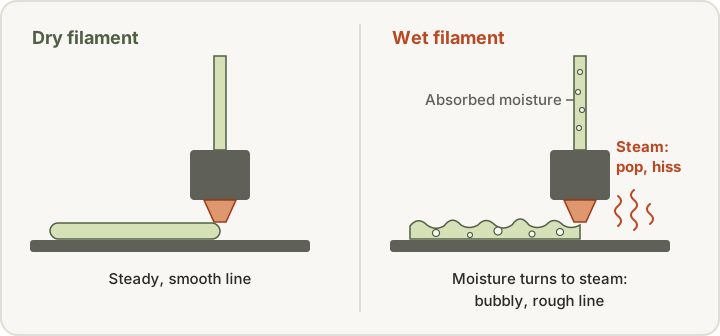
Wet filament usually announces itself at the nozzle. Makers list popping, hissing or sizzling as it extrudes, more stringing than usual, rough or bubbly surfaces, weak or brittle layers, and poor bridges. Nylon, PVA, TPU and PETG absorb moisture most readily; PLA is less affected, though not immune. The quickest check is to print the same small test with a freshly opened or dried spool. If it's moisture, dry the spool at the filament maker's temperature and time, or your printer maker's table if the filament maker publishes none. Prusa's table for its Prusament filaments, for example, gives 45 °C for 6 hours for PLA and 55 °C for 6 hours for PETG. Then store it sealed with desiccant. Bambu Lab says freshly dried filament at around 55% relative humidity can pick up enough moisture to affect prints within 2 to 12 hours.
Quick checks
| Symptom | First check | Typical first change |
|---|---|---|
| Popping, hissing or sizzling at the nozzle | Moisture; Polymaker says "that's water vapor escaping" | Print the same test with a fresh or dried spool |
| More stringing than usual | Whether a fresh spool strings just as badly | If it doesn't, dry the spool; if it does, check temperature and retraction |
| Rough, pitted or bubbly surfaces | How long the spool has been open, and where | Dry at the filament maker's settings, or your printer maker's table |
| Weak or brittle layers | Moisture, or age and the material itself | Dry once and reprint; if it snaps rather than pops, check for brittleness |
| Problems return soon after drying | Storage humidity and the desiccant | Seal it with desiccant straight away, and check with a hygrometer (Bambu Lab) |
| Stringing on a Prusa XL, even with PLA | Heated idle toolheads (Prusa) | Dry filament before printing on the XL, as Prusa recommends |
This guide is for anyone whose prints have suddenly turned stringy, rough or weak, or whose printer pops and crackles while extruding. It covers the signs makers link to wet filament, which materials are most at risk, simple checks, the drying tables Prusa and Bambu Lab publish, how to store a spool afterwards, and when drying isn't the answer.
Why does moisture cause print problems?
Prusa says the materials used for FFF printing "are mostly hygroscopic," meaning they "readily attract water molecules from the environment." Polymaker says absorbed moisture "turns into steam when the filament is heated in the hotend," and that this steam disrupts extrusion. Bambu Lab describes the same process: the moisture "rapidly vaporizes inside the hot nozzle," so the molten filament expands, extrudes erratically, and forms bubbles. It says these problems get worse as humidity rises or the filament stays exposed for longer.
Signs your filament is wet
Makers list overlapping symptoms:
| What you notice | What makers say |
|---|---|
| Popping, hissing or sizzling at the nozzle | Polymaker: "that's water vapor escaping." Its stringing guide calls a popping or cracking noise a sign the filament has "likely absorbed too much moisture." |
| Bubbling, or smoke during extrusion | Prusa says a high water content can cause "bubbling and smoke during extrusion." |
| More stringing and oozing than usual | Polymaker, Bambu Lab and Prusa all list stringing. Prusa says moisture "will cause a lot of stringing." |
| Rough, poor or pitted surfaces | Prusa says poor surface quality is usually "the general first signal." Bambu lists holes and rough surfaces. |
| Blobs on the print | Prusa lists blobs among the effects of a high water content. |
| Weak or brittle parts, poor layer adhesion | Polymaker lists "weak, brittle layers." Prusa lists low layer adhesion, and Bambu lists reduced strength. |
| Poor bridges | Polymaker says poor bridging "can also result from wet filament," because moisture causes bubbling and inconsistent extrusion. |
Some material guides add their own notes. Prusa says moist polyamide "makes bubbles, which leads to uneven layers and an ugly surface," and that flexible filaments "can be hard to print when wet."
Which materials absorb moisture fastest?
Makers rank materials a little differently, but they agree on the main groups.
- Polymaker's groups: "Highly hygroscopic" for nylon, PVA, TPU and PETG. It says drying is crucial for these, and in humid climates they often need to stay in a dryer even while printing. "Moderate sensitivity" for ABS and some specialty copolymers. "Low sensitivity" for PLA, which it says "can still take on moisture over time or in damp conditions."
- Prusa: It names polyamide, polypropylene, PVA and BVOH as highly hygroscopic, and says they should be stored dry or dried before every print. It says polyamide, PVA and TPU need drying more often than PLA, and that "PLA, for example, doesn't change properties too much by uptaking humidity, whereas Polyamide is affected quite significantly." Its nylon guide says improperly stored polyamide can absorb water weighing up to 10% of the filament's weight.
- Bambu Lab: Its drying table marks drying before use as "Required" for PLA Wood, TPU, PC, PVA, Support for PA/PET, PA-based and PET-CF filaments, PPA-CF and PPS-CF, and "Recommended" for its other PLA grades, PETG, ABS and ASA.
For problems specific to the two most common materials, see our PLA printing problems and PETG printing problems guides.
How fast it happens
Bambu Lab gives the clearest timing. It says typical indoor air is around 45–65% relative humidity, and that at around 55% RH, freshly dried filament "will usually absorb enough moisture to affect print quality within 2~12 hours, depending on how hygroscopic the filament type is." Even at 20% RH, it says filaments generally stay dry for only 2–7 days.
A special case: Prusa XL
Prusa says the Original Prusa XL is more sensitive to filament moisture than single-tool printers. Unused toolheads stay heated (70 °C idle by default), so moisture is released inside the tool and causes stringing. Prusa says that on the XL "even PLA can absorb enough moisture to create printing issues," and recommends drying filament before printing on it.
Simple checks before you change settings
- Listen. Popping or hissing during extrusion is the sign Polymaker and its stringing guide point to.
- Swap the spool. Prusa's stringing guide suggests trying a different spool. If a freshly opened or dried spool of the same material prints cleanly, the first spool is the problem.
- Think about its history. Polymaker says that if a spool "hasn't been used in a long time, it's safest to dry it before printing." Bambu Lab also recommends drying first when storage conditions are uncertain.
- Don't blame every string on moisture. Prusa says some filaments are "naturally more stringy than others," so compare results before deciding. Our stringing guide covers the settings side.
- Measure storage humidity. Bambu suggests a hygrometer in the sealed container to check the real humidity level.
A factory-sealed spool is a useful reference. Polymaker says it dries every spool before vacuum-sealing it with desiccant, so a new spool should be ready to print "provided the seal is intact."
How to dry it
Use the filament maker's settings for that exact product first. If it publishes none, use your printer maker's table. Polymaker says to follow the recommended drying times and temperatures for your filament "to avoid damaging or deforming it."
Prusa's drying table
Prusa publishes these temperatures and times for Prusament materials. It says not to exceed them, "or the filament will soften and stick together," and to stick to the times "to prevent overdrying."
| Material | Temperature | Time |
|---|---|---|
| PLA/rPLA | 45 °C | 6 hours |
| Woodfill | 45 °C | 6 hours |
| PVB | 45 °C | 8 hours |
| PETG (all versions) | 55 °C | 6 hours |
| TPU | 60 °C | 4-6 hours |
| PP Carbon Fiber/Glass Fiber | 70 °C | 2-4 hours |
| ASA | 80 °C | 4 hours |
| PC Blend | 85 °C | 5 hours |
| PC Blend Carbon Fiber | 90 °C | 4 hours |
| PC Space Grade | 90 °C | 4-6 hours |
| PA11 Carbon Fiber | 90 °C | 6 hours |
| PEI | 150 °C | 8 hours |
Prusa's nylon guide separately says to dry polyamide "at least 4 hours at a temperature below 90 °C."
Bambu Lab's drying table
Bambu Lab publishes figures for its own filaments across several methods. Temperatures are in °C and times in hours, copied from its table. We left out its desiccant, flip-interval and cover columns. "Not compatible" means Bambu says that unit can't dry that material.
| Filament | Drying before use | Forced-air oven | AMS 2 Pro | AMS HT | Heated bed (H, X, P2S, P1S) |
|---|---|---|---|---|---|
| PLA Basic / PLA Matte | Recommended | 50, 8 h | 45, 12 h | 45, 12 h | 60-70, 12 h |
| PLA Silk | Recommended | 55, 8 h | 45, 12 h | 45, 12 h | 65-75, 12 h |
| PLA-CF / GF | Recommended | 50-60, 8 h | 45, 12 h | 45, 12 h | 65-75, 12 h |
| PLA Wood | Required | 55-65, 8 h | 45, 12 h | 45, 12 h | 70-75, 12 h |
| PLA Aero | Recommended | 55, 8 h | 45, 12 h | 45, 12 h | 60-70, 12 h |
| PLA Galaxy | Recommended | 55, 8 h | 45, 12 h | 45, 12 h | 65-75, 12 h |
| Support for PLA | Recommended | 55, 8 h | 60, 12 h | 60, 12 h | 65-75, 12 h |
| Support for PLA/PETG | Recommended | 75, 8 h | 60, 12 h | 60, 12 h | 65-75, 12 h |
| PETG, PETG-CF | Recommended | 60-65, 8 h | 65, 12 h | 65, 12 h | 75-85, 12 h |
| ABS, ASA | Recommended | 75-85, 8 h | Not compatible | 80, 8 h | 90-100, 12 h |
| ASA-CF, ABS-GF | Recommended | 80, 8 h | Not compatible | 80, 8 h | 90-100, 12 h |
| ASA Aero | Recommended | 80, 8 h | Not compatible | 80, 8 h | 90-100, 12 h |
| TPU 85A, TPU 90A | Required | 70, 8 h | 65, 12 h (may not fully dry TPU) | 75, 18 h | 90, 16 h |
| TPU 95A HF | Required | 70, 8 h | 65, 12 h (may not fully dry TPU) | 75, 18 h | 80-90, 12 h |
| TPU for AMS | Required | 70, 8 h | 65, 12 h (may not fully dry TPU) | 75, 18 h | 80-90, 12 h |
| PC | Required | 75-85, 8 h | Not compatible | 80, 8 h | 90-100, 12 h |
| PVA | Required | 75-85, 8-12 h | Not compatible | 85, 18 h | 90-100, 12 h |
| Support for PA/PET | Required | 75-85, 8-12 h | Not compatible | 80, 12 h | 90-100, 12 h |
| PA6-CF/GF, PAHT-CF/GF, etc. | Required | 75-85, 8-12 h | Not compatible | 85, 12 h | 90-100, 12 h |
| PET-CF | Required | 80, 8-12 h | Not compatible | 80, 12 h | 90-100, 12 h |
| PPA-CF, PPS-CF | Required | 100-140, 8-12 h | Not compatible | Not compatible | 110-120 (maximum), 10-12 h; less effective than a convection oven |
| Support for ABS | Not required but recommended | 80, 4 h | Not compatible | 80, 4 h | 85-95, 6 h |
Notes from Bambu's page:
- AMS 2 Pro suits filaments needing no more than 65 °C. For TPU, Bambu suggests the heated bed or AMS HT instead. When drying a high-temperature filament, take the low-temperature spools out.
- AMS HT can dry all filaments, but Bambu says some, such as PVA, PPS-CF and PPA-CF, may still not dry fully.
- Heated-bed drying works on the enclosed H series, X series, X2D, P2S and P1S. Bambu says the open-frame P1P, A1, A1 mini and A2L can't be used to dry filament. Cover the spool and flip it midway, as its instructions describe. The P1S has no built-in drying feature, so you set the bed temperature and time it yourself.
The two tables don't match
Prusa and Bambu publish different numbers for the same material type. PETG, for example, is 55 °C for 6 hours in Prusa's table and 60–65 °C for 8 hours in a forced-air oven in Bambu's. Bambu's own PETG figures don't match each other either: its filament guide gives 70 °C for 8 hours in a blast drying oven, and its PETG Basic data sheet gives 65 °C for 8 hours. Each table is written for that maker's own filaments, so use the one that matches your spool, or the filament maker's own figures.
After drying, print the same small test again. If the popping, stringing or roughness has gone, moisture was the cause. Our dryer vs dry box comparison explains the equipment options. If moisture keeps coming back and you decide a dryer is worth it, our filament dryer shortlist lists options.
Storage after drying
Drying only lasts as long as the storage does.
- Seal it straight away. Bambu says to store moisture-sensitive filament in a sealed container or AMS with effective desiccant immediately after drying, and use it as soon as possible.
- Use desiccant. Prusa recommends a closed box with desiccant, or vacuum bags with a desiccant inside. Polymaker suggests airtight bags, dry boxes with desiccant, or vacuum containers.
- Watch the desiccant. Bambu says its AMS silica-gel desiccant has yellow indicator beads that turn green as they absorb moisture. If the whole pack looks dark green, replace or regenerate it.
- Print from a dry environment if you need to. Polymaker says highly hygroscopic materials often need to stay in a dryer while printing in humid climates. Bambu says that when you print while an AMS 2 Pro or AMS HT is drying, it lowers the drying temperature, for example to 45 °C when drying PLA.
- Prioritize. If storage space is short, Prusa suggests prioritizing the most hygroscopic filaments.
Our filament storage guide covers containers, desiccants and hygrometers in more detail.
When won't drying help?
Drying fixes moisture, not every print problem. It's unlikely to help when:
- Nylon has sat in open air for months. Bambu says PA-based filaments left in open air for around 3 months absorb so much moisture that they become "very difficult to dry" in a convection oven at 80–90 °C.
- The spool has been dried too often. Bambu says PC "may become brittle after repeated 'heating–cooling' drying cycles," which raises the risk of filament breaking during printing. Prusa also warns against overdrying.
- It was dried too hot. Prusa says filament dried above its temperature can "soften and stick together," and that high temperatures damage filament "even if left for less time than recommended."
- The stringing is a settings problem. If a fresh spool strings just as badly, look at temperature and retraction instead. See our stringing guide.
- The filament snaps rather than pops. Brittleness can come from age, tension or the material itself, not just moisture. Our brittle filament guide covers how to tell the difference.
If layers split or parts are weak even with dry filament, our layer adhesion guide covers temperature, cooling, drafts and flow.
A sensible order
- Listen for popping or hissing, and look for new stringing, roughness or bubbles.
- Print the same test with a freshly opened or dried spool of the same material.
- Dry the suspect spool once, at the filament maker's settings or your printer maker's table.
- Print the test again and compare.
- Store the spool sealed with desiccant, and check the humidity with a hygrometer.
- If nothing changed, look at slicer settings or other causes rather than drying again.
Sources
- Wet Filament, Polymaker
- Hairy or Stringy Prints, Polymaker
- Poor Bridging, Polymaker
- Drying filament, Prusa Research
- Stringing and oozing, Prusa Research
- Polyamide (Nylon), Prusa Research
- Flexible materials, Prusa Research
- Filament Drying Recommendations, Bambu Lab
- Filament guide: printer, nozzle, AMS, build plate and glue compatibility, Bambu Lab
- Bambu PETG Basic Technical Data Sheet V3.0, Bambu Lab
This page is research-based: we have not tested the products or methods ourselves. It draws on the manufacturer documentation and sources listed. Exact settings and fit always defer to your printer and filament makers.
Keep reading

Filament dryer vs dry box: drying and storage explained
A dry box keeps dry filament dry; a dryer removes moisture that is already in it. How to tell which problem you have, and what to do safely.

Filament storage: sealed containers, desiccant, and moisture exposure
How to keep opened spools dry with sealed containers, the right desiccant and a hygrometer, and why storage cannot fix filament that is already wet.

Stringing troubleshooting: moisture, temperature, and motion settings
How to diagnose stringing and oozing one change at a time: check filament moisture, nozzle temperature, retraction, and travel settings before buying parts.