Warping and lifted corners: diagnose before you buy anything
Why corners lift and tall parts split, and how to check material, surface, drafts, cooling, and brims one at a time before buying an enclosure or plate.
On this page (8 sections)
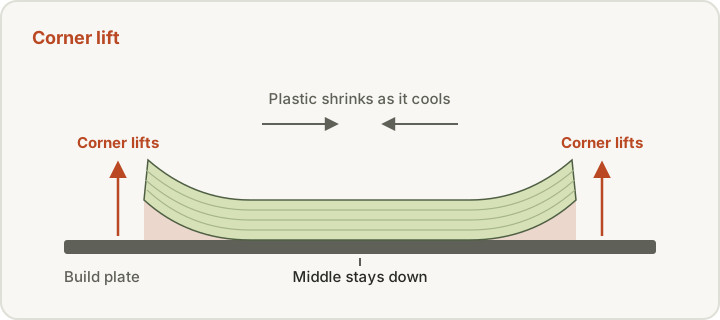
Warping is usually shrinkage plus uneven cooling plus adhesion that isn't strong enough to resist the pull, so start by cleaning the surface the way your plate maker specifies and checking the first layer. Prusa describes warping as plastic shrinking after a sudden temperature difference between the nozzle and the surrounding air, and Polymaker adds that parts poorly adhered to the plate are far more likely to curl. Next, look for drafts, check fan settings and add a brim, changing one thing per print. Cooling cuts both ways: Prusa says PLA and PETG need a lot of it, while for ABS or PC Blend it suggests low fan speeds (10–20%) only where overhangs and small features curl. Before buying an enclosure or a new build plate, confirm the material. An enclosure genuinely helps with ABS, ASA, PC and nylon, but it's usually the wrong answer for PLA and PETG.
Quick checks
| Symptom | First check | Typical first change |
|---|---|---|
| Corners lift on PLA or PETG | Fan on, spinning and not blocked | Clean the plate and check first-layer height |
| Corners lift on ABS, ASA or PC Blend | Drafts near the printer | Add a brim and a skirt as a draft shield |
| Whole part lets go of the bed | Plate cleanliness and fan speed | Clean per the plate maker, fan back to the material profile |
| Overhangs or small features curl on ABS or PC Blend | Too little cooling | Low fan speed, 10–20% (Prusa) |
| Cracks between layers on tall parts | Drafts and room temperature | Enclosure or draft shield; slower and hotter within range (Polymaker) |
| Lift starts mid-print after a good start | Bed temperature | Watch the bed temperature through the whole print |
This guide is for anyone whose corners lift off the bed, whose whole part pops loose mid-print, or whose tall ABS or ASA parts crack between layers. It sorts the symptoms, lists the competing causes as manufacturers describe them, and gives a test order that avoids spending money on the wrong fix.
What does warping look like, and what isn't warping?
Several different defects get called "warping." Telling them apart narrows the cause:
- Corner lift. The corners of a flat or boxy part curl up while the middle stays down. Prusa notes this happens mostly with large objects and high-temperature materials such as PC Blend, ASA, or ABS.
- Whole-part lift. The entire part lets go of the bed, often partway through the print. Polymaker links this strongly to adhesion and first-layer distance.
- Layer splitting (delamination) on tall parts. The base stays stuck but a crack opens between layers higher up. Polymaker describes this as the same shrinkage and temperature-gradient problem showing up in the layers instead of at the bed, and says it can be "unavoidable on tall ABS prints not in an enclosed environment."
- Elephant's foot. The bottom few layers bulge outward. That's not warping, and the fixes pull in different directions: Polymaker names a too-hot build plate as one cause of elephant's foot, so raising bed heat to fight "warping" can make it worse. See elephant's foot.
One symptom on one print rarely proves a cause. Note where the lift starts (corners, one side, the whole footprint), when it starts (first layers or late in the print), and whether it follows the material, the plate, or the printer's location.
Symptom-to-cause table
The table below maps each symptom to the causes the cited manufacturers name for it, in their wording where possible. It's a starting point for checks, not a diagnosis.
| Symptom | Likely causes named by sources | First check |
|---|---|---|
| Corners lift on large parts in ABS, ASA, or PC Blend | "Sudden temperature difference" between nozzle and ambient air, so the plastic shrinks (Prusa). High shrinkage and internal stress in ABS (Polymaker). Prusa gives ABS shrinkage as "around 1-2%." | Drafts near the printer, draft shield or skirt, brim, enclosure for these materials |
| Corners lift on PLA or PETG | Print fan disabled, too slow, or obstructed (Prusa: these materials "need a lot of cooling"). Poor adhesion or first layer too far from the plate (Polymaker). | Clean plate, first-layer height, fan working and shroud clear |
| Whole part lifts or the base curls | Too much part-cooling fan, which Prusa says "may warp and lift up the whole object." Greasy or contaminated surface (Prusa, Bambu Lab). | Plate cleaning per maker, fan speed back to the material profile |
| Steep overhangs or small features curl up | Too little cooling, even on ABS or PC Blend, especially in an enclosure or among supports that retain heat (Prusa). | Prusa suggests trying low fan speed (10–20%) for those materials |
| Cracks between layers on tall parts | Temperature gradients and internal stress when the base is well stuck (Polymaker). Too much fan lowering layer adhesion (Prusa). | Enclosure or draft shield, less infill and more walls, slower and hotter within the material's range (Polymaker) |
| Lift appears mid-print after a good start | Build plate not holding temperature, for example from overheating electronics in a hot enclosure (Polymaker). | Watch the bed temperature through the whole print |
| Nylon parts warp even with a clean plate | Crystallization during printing (Polymaker). Poor adhesion of polyamide to standard PEI sheets (Prusa). | Material-specific plate, dry filament, enclosure |
What causes warping?
Material shrinkage
Every thermoplastic shrinks as it cools, but not by the same amount. Polymaker says you "will almost never" see warping with PLA on a level plate because of its low shrinkage and internal stress, while ABS is "an entirely different matter." Prusa's ABS guide gives a shrinkage factor "usually somewhere around 1-2%" and lists significant warping as one of ABS's main disadvantages. Its ASA guide calls significant warping the main disadvantage of ASA too, though it says ASA warps less than ABS. Grades and blends vary by manufacturer, so treat these as material-family tendencies, not numbers for your exact spool.
Temperature difference and drafts
Prusa's warping article puts the cause plainly: a sudden temperature difference between the melt and the room makes the plastic shrink and warp. It warns that "an open window or an AC unit nearby the printer will increase the occurrence of warps." Polymaker makes the same point about the gap between a hot bed and a cooler room. Both the ABS and ASA guides from Prusa ask for a well-ventilated room for fumes but add: "do not create a draft around the print."
Dirty or mismatched build surface
Oils from fingers are invisible until the first layer fails. Prusa recommends wiping its sheets with IPA 90%+ before prints. Bambu Lab's cleaning guide for its Textured PEI Plate takes a different approach: wash with dishwashing detergent (without oils or moisturizers), warm water, and a sponge, because alcohol "might just spread the oils" on a textured surface. Bambu also says, "Do not clean the Textured PEI with Acetone, as it will damage the PEI surface." Follow the instructions for your own plate rather than borrowing another brand's method.
Surface choice matters too. Prusa's sheet guide says a glue-stick separation layer "may be required" for PETG, ASA, ABS, and PC Blend or prints with a large first layer, and that polyamide adhesion to standard PEI sheets "is generally very poor," which is why it sells a dedicated PA Nylon sheet. Bambu's filament guide lists compatible plates, glue requirements, and bed-temperature ranges per material for its own plates. See the textured vs smooth surfaces guide for the trade-offs.
First-layer height
Polymaker says a print has "an exponentially higher chance of warping" when part of it is too far from the plate. Prusa suggests lowering its Live Adjust Z slightly to increase adhesion, "but not too much," and warns that PETG and PC can stick hard enough to damage a PEI surface. Our first-layer adhesion guide walks through this check.
Part cooling, too high or too low
Cooling cuts both ways. Prusa says PLA and PETG need a lot of print cooling, and corners lifting on those materials is a reason to check the fan is on, spinning, and not blocked. For ABS or PC Blend it suggests low fan speeds (10–20%) only for curling overhangs and small features, and warns that too much fan "may warp and lift up the whole object" and weaken layer bonding.
Geometry
Large flat footprints and sharp corners concentrate the pull of shrinkage. Prusa's sheet guide notes that prints with a small contact area or sharp corners are less likely to detach on its smooth sheet, and its warping guide suggests orienting problem areas toward the center of the bed. Polymaker says very large, dense parts benefit from a brim even in PLA, and that denser parts are more prone to delamination.
Safe checks, one change at a time
Start from your printer maker's slicer profile for the exact material. Prusa opens its troubleshooting list with exactly that: its profiles "are already refined for each material." Then work through these, one per test print, and write down the result:
- Clean the plate the way its maker specifies. IPA 90%+ for Prusa sheets; detergent and warm water for Bambu's Textured PEI Plate; no acetone on Bambu's textured plate. Let the plate cool before handling it.
- Check the first layer and Z offset. A slightly lower first layer can help, but over-squishing causes other problems.
- Confirm the bed temperature matches the maker's range for your material and plate. Bambu's filament guide and Prusa's material guides each publish their own ranges. Don't exceed what the printer is rated for, and on PLA and PETG remember the elephant's foot trade-off.
- Add a brim. Prusa calls a brim a good way to increase adhesion. If that isn't enough, it suggests adding a small, few-layer-tall shape (such as a tiny cylinder) at the problem corner, sometimes called a mouse ear.
- Block drafts. Move the printer away from windows, fans, and air-conditioning vents. For ABS, ASA, and PC Blend, Prusa suggests a skirt printed as a draft shield to hold heat around the part.
- Set the fan for the material. Plenty for PLA and PETG; low or none for ABS and ASA except where overhangs curl.
- Slow down for high-warp materials. Prusa says decreasing print speed "may help a lot with high-warping materials," and Polymaker suggests slower and hotter for ABS and ASA, within the filament maker's stated range.
- Look at the geometry. Center the problem area, round off sharp corners in the model if the design allows, or print several parts at once, which Prusa says can help retain heat.
Material-specific notes
PLA and PETG
These materials rarely warp badly on a clean, level plate, and they depend on part cooling. Prusa says printing PLA or PETG in an enclosure "might not be a good idea" because the higher ambient temperature makes cooling harder. Bambu Lab's filament guide lists PLA, PETG, and TPU as "not prone to warping," but its warping guide includes PETG in its list of shrinkage-prone filaments, ranked below ABS and ASA and above only PLA, and says that below 20 °C "warping can occur even with PLA and PETG." The filament guide goes further for enclosed printers: for low-softening filaments it recommends opening the front door or removing the top glass above certain bed temperatures so chamber heat doesn't soften the filament. Bambu does recommend an enclosed printer for PETG for interlayer strength in cold rooms, which shows how product-specific this advice is. Our PLA printing problems and PETG printing problems guides cover other fixes for each material. See PLA vs PETG and the PLA: what to check before you buy a spool ↗.
ABS, ASA, and PC
These are the materials where an enclosure genuinely helps. Prusa says ABS printing needs an enclosure with higher ambient temperature, and that an enclosure "is necessary for printing large parts" in ASA. Polymaker suggests an ambient of at least 50 °C for ABS or ASA and warns that hot chambers can overheat motors and electronics. Bambu Lab's guide recommends an enclosed printer for ABS, ASA, PC, PA, and their reinforced grades. If you have no enclosure, Prusa points to the draft shield option as "one simple alternative." Prusa also warns about printer parts: its ABS guide says printing inside an enclosure can deform the fan shroud and other plastic parts, and its ASA guide says printing "a lot of ASA in an unventilated enclosure" can deform the fan shroud and extruder parts over time. For the material choice itself, see the ABS: what to check before you buy a spool ↗ and our ABS vs ASA guide.
Nylon
Prusa says the main disadvantage of pure polyamide, besides moisture, is warping, and that high ambient temperature helps a lot. It recommends its PA Nylon sheet because standard PEI adhesion is poor, and notes that carbon-fiber-filled polyamides warp much less. Polymaker attributes nylon warping to crystallization. Its Warp-Free technology is Polymaker's own claim about its own nylons: its warping guide names the PolyMide family, and its Fiberon PA12-CF10 and PA612-CF15 pages make the claim too. It isn't a property of nylon in general. Dry nylon per the filament maker before printing; see the Dryers & dry boxes: what to check before you buy ↗.
When an enclosure is the answer, and why it still isn't ventilation
An enclosure is worth considering if you print ABS, ASA, PC, or nylon regularly, the room is cool or drafty, and you've already confirmed the surface, first layer, brim, and draft shield. It's usually the wrong answer for PLA and PETG warping.
An enclosure holds heat; it doesn't remove what the printer emits. Prusa's ABS and ASA guides both call for a well-ventilated room because of fumes. UL Chemical Insights says the highest priority is placing printers where ventilation dilutes emissions or using local exhaust vented outside, with filtration as a second measure. In UL's research, a ventilated enclosure reduced particle concentration by 99.7% and TVOC by 69.5%, figures for the setups UL studied rather than any enclosure. Plan ventilation with the enclosure, not instead of it. Our enclosure planning guide and the Enclosures: what to check before you buy ↗ go further.
When should you hold off on buying parts?
Hold off on a new plate, enclosure, or printer if:
- You haven't cleaned the plate the maker's way. Bambu's guide shows that contamination you can't see can wreck adhesion.
- You're on a custom or borrowed profile. Go back to the maker's material profile first.
- The warping is in PLA or PETG. Check cooling, the first layer, and drafts; an enclosure can make these materials harder to print.
- The printer sits near a window, fan, or vent. Moving it costs nothing.
- You haven't tried a brim or draft shield. Both are slicer settings.
- The material is the real problem. Polymaker suggests choosing a lower-shrinkage material when the part doesn't need ABS's properties. See the filament finder.
A new plate makes sense when the coating is visibly worn or damaged after correct cleaning, or the material needs a surface you don't have, such as a dedicated sheet for nylon. See the Build plates: what to check before you buy ↗. An enclosure makes sense when you print high-shrinkage materials regularly and have a plan for ventilation.
Sources
- Warping, Prusa Research
- Warping (Common printing issues), Polymaker
- Fiberon PA12-CF10, Polymaker
- Fiberon PA612-CF15, Polymaker
- Elephant Foot (Smooshed First Layer), Polymaker
- ABS material guide, Prusa Research
- ASA material guide, Prusa Research
- Flexible steel sheets guidepost, Prusa Research
- Filament guide: printer, nozzle, AMS, build plate, glue compatibility and required parameters, Bambu Lab
- Model warping, falling off, or collapsing, Bambu Lab
- Bambu Lab Textured PEI Plate Cleaning Guide, Bambu Lab
- 3D printing emissions and its impact on health, UL Chemical Insights
This page is research-based: we have not tested the products or methods ourselves. It draws on the manufacturer documentation and sources listed. Exact settings and fit always defer to your printer and filament makers.
Keep reading

First-layer adhesion: surface, calibration, and material checks
Diagnose first layers that won't stick, lift at the corners, or look over-squished: clean the surface, check Z offset, then the material.
Textured vs Smooth Build Surfaces: Compatibility and Release Considerations
How smooth and textured PEI differ in finish, adhesion, release, and cleaning, and why plate fit depends on your exact printer model.

PLA vs PETG: Choosing for the Actual Project
How to choose between PLA and PETG by what the part has to do: heat, stiffness, toughness, print ease, stringing, and build-plate release.